
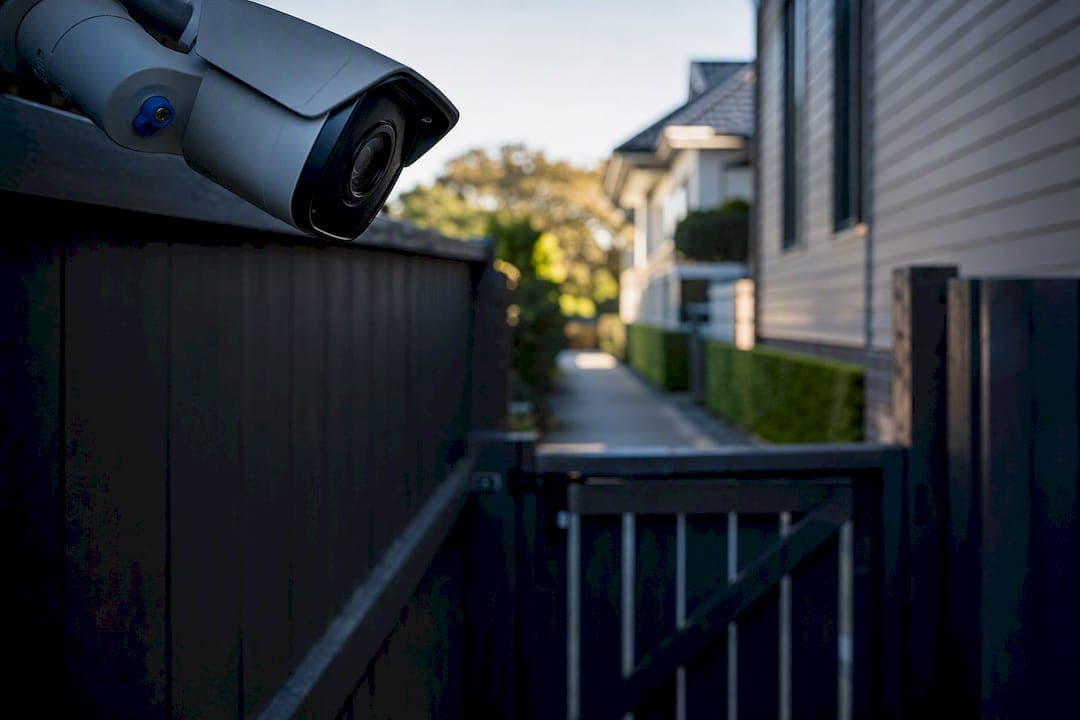
CCTV is legal in Australia for both homeowners and businesses, but the rules that apply depend entirely on who's operating the camera and which state or territory you're in. Individuals recording on their own property generally sit outside the Privacy Act 1988, while organisations face full Australian Privacy Principles (APP) obligations. Everyone, regardless of size, is bound by their state's surveillance or listening devices legislation. The three moves that cut your legal risk fastest: confirm your state's audio and optical device rules, avoid capturing neighbors' private spaces, and post compliant signage that names who's watching and why.
TL;DR:
- CCTV operators in Australia must adhere to different laws depending on whether they are individuals on private property or organizations, with strict rules on capturing private spaces and posting clear signage.
- Placing cameras to avoid private areas and using privacy masking software are essential steps to minimize legal risks, especially concerning audio recording and boundary angles.
- Employers must follow specific notice and consultation procedures, such as providing written notice and signage before surveillance starts, to stay compliant in workplaces.
- Proper storage, access controls, and retention policies are necessary to protect personal information and meet Australian Privacy Principles, with clear documentation being crucial for legal defense.
- Violating CCTV or privacy laws can lead to significant fines and civil penalties, especially in cases involving criminal recording, unlawful sharing, or privacy breaches.
Table of Contents
- Understanding CCTV Privacy Laws in Australia: The Federal and State Framework
- Where Can You Point a Security Camera Legally?
- What Are the Rules for Workplace CCTV Surveillance?
- How Should Businesses Manage and Store CCTV Footage?
- Compliance Checklist: Documents Every CCTV Operator Should Have
- What Happens If You Break CCTV or Privacy Laws in Australia?
- Technical Measures That Reduce Your Legal Exposure
- Guidance on Consent Requirements Across Australian Jurisdictions
- Commercial vs. Residential CCTV: How the Rules Actually Differ
- Special Considerations for CCTV in Rental Properties
- How CCTV Affects Visitor and Customer Privacy Rights
- How to Run a Privacy Impact Assessment for a CCTV System
- Best Practices for Reporting a CCTV Data Breach
- Balancing Security and Privacy in Real Installations
- Get a Compliant CCTV System Installed the Right Way
- Sources
- FAQ
Understanding CCTV Privacy Laws in Australia: The Federal and State Framework
Two separate legal systems govern CCTV in Australia, and mixing them up is the most common compliance mistake.
The Privacy Act 1988 (Cth) sets the federal layer. It generally applies to organisations, typically those with annual turnover above $3 million, and does not cover an individual operating a camera in a private or household capacity, according to the OAIC. If you're a business running CCTV, the Australian Privacy Principles govern how you collect, store, use, and disclose footage that identifies a person.
The second layer is state and territory surveillance and listening devices legislation, and this is where things get genuinely complicated. Every state regulates audio recording of private conversations, but only some regulate optical (video) surveillance the same way. Consent rules for audio also shift by jurisdiction, some require every party's consent, others only one party's.
Key points to hold onto:
- The Privacy Act's household exemption does not override state surveillance laws for individuals.
- Recording a private conversation without the required consent can be a criminal offence, separate from any privacy law breach.
- A 2026 addition to the Privacy Act, the Schedule 2 statutory tort for serious invasions of privacy, gives individuals a direct civil pathway if footage capture amounts to a serious intrusion., even outside the APP framework.
- Businesses operating across multiple states should default to the strictest applicable jurisdiction's rules rather than trying to run different standards site by site, a position legal commentary on workplace surveillance backs for exactly this reason.
Where Can You Point a Security Camera Legally?
Camera placement is where most disputes actually start, usually between neighbors rather than with regulators. The general principle: you can capture your own property and reasonable sightlines onto public or shared space, but you cannot deliberately capture the inside of a neighbor's home, their bedroom windows, or bathrooms.
State-by-state analysis shows some jurisdictions treat optical devices as a specific offence category: New South Wales, Victoria, Western Australia, South Australia, and the Northern Territory regulate video surveillance directly, while Queensland, Tasmania, and the ACT focus their surveillance laws on listening devices instead. That gap matters because a camera that would be perfectly fine in Brisbane might trigger a different analysis in Sydney.
Practical steps that keep installations defensible:
- Angle cameras downward and toward your own boundary rather than across it.
- Use privacy masking in the camera's software to blackout any accidental capture of a neighbor's window.
- Disable onboard microphones unless you have a specific, documented reason to record audio.
- Post signage at entry points so anyone entering the property has notice before they're recorded.
- Review footage periodically to confirm the field of view still matches what you intended when you installed it.
Microphones deserve special caution. Video-only capture and audio capture are judged under different rules in most states, and adding a microphone introduces a separate offence risk that video alone does not carry, particularly where consent from all parties to a conversation is required. For a full breakdown of mounting heights and angles, DJC Engineering's guide to CCTV camera placement covers the practical side in more depth.
What Are the Rules for Workplace CCTV Surveillance?
Employers face the strictest notice and consultation requirements in the whole CCTV landscape, and the obligations differ by state. In New South Wales, employers must give workers written notice at least 14 days before surveillance starts, along with visible signage indicating where cameras operate. The ACT takes a different approach: employers must run a genuine consultation process with staff for a minimum of 14 days before switching on any surveillance.
Certain areas are effectively off-limits regardless of jurisdiction, staff bathrooms, change rooms, and lactation rooms chief among them. Recording in these spaces is rarely justifiable and often prohibited outright.
To keep your workplace CCTV defensible:
- Put notice and consultation in writing, with dated records of when staff were told and what was communicated.
- Keep a register of camera locations and their stated purpose (security, stock loss, safety).
- Set a clear process for staff to request access to footage that shows them, and a timeframe for responding.
- Review your policy annually as cameras or locations change.
Pro Tip: Don't just email staff once and call it done. Keep a signed acknowledgment or meeting minutes showing consultation happened, because if a dispute ends up before Fair Work or a regulator, documentation is what actually protects you. DJC Engineering's rundown on workplace surveillance policy requirements walks through what a compliant policy document should contain.
How Should Businesses Manage and Store CCTV Footage?
Collecting footage lawfully is only half the job. What you do with it afterward is where the Australian Privacy Principles do most of their work.
Several APPs apply directly to CCTV footage once an organisation is covered by the Privacy Act: APP 1 requires a clear privacy policy explaining what you collect and why, APP 5 requires notifying people that collection is happening, APP 6 restricts use and disclosure to the stated purpose, APP 11 requires reasonable security safeguards, and APP 12 gives people a right to request access to footage of themselves.
In practice, that means:
- Set a retention period tied to your actual purpose, most incident-review footage doesn't need to sit on a server for more than 30 to 90 days unless it's part of an active investigation.
- Document your destruction or overwrite process so you can demonstrate it if asked.
- Restrict footage access to named staff with logged credentials rather than a shared login everyone uses.
- Redact or blur third parties who appear incidentally in footage before releasing it in response to an access request.
Getting this wrong isn't hypothetical. The OAIC's guidance on security cameras treats footage as personal information the moment someone is identifiable in it, which pulls the full weight of the APPs into play.
Compliance Checklist: Documents Every CCTV Operator Should Have
A handful of documents separate a defensible setup from a liability.
- Signage at every entry point, naming the operator, stating the purpose of recording, giving a contact method, and pointing to a full privacy policy online.
- A privacy policy covering what's collected, why, how long it's kept, who can access it, and how someone requests their own footage.
- A workplace CCTV policy (for employers) documenting notice, consultation, prohibited zones, and access procedures.
- A vendor or installer agreement requiring your CCTV provider to handle hosting, backups, and data security in a way that matches your retention and access commitments.
Pro Tip: If you outsource footage storage to a cloud provider, get the retention and deletion terms in writing before installation, not after a request for footage lands on your desk. Business is a useful starting checklist before you sign anything with an installer.
What Happens If You Break CCTV or Privacy Laws in Australia?
Penalties vary by state, but they're not trivial. South Australia's Surveillance Devices Act 2016 sets substantial maximum fines for both individuals and bodies corporate, and treats recording and then sharing that recording as two separate offences, so a single bad decision can trigger two charges.
Beyond state criminal penalties, the OAIC can investigate organisations for APP breaches and issue enforceable undertakings or seek civil penalties in serious cases. The new statutory tort for serious invasions of privacy also gives affected individuals a direct civil claim.
If something's gone wrong on your end:
- Preserve the footage rather than deleting or overwriting it, even if it's unflattering.
- Get legal advice before responding to a complaint or regulator inquiry.
- For neighbor disputes specifically, the IPC NSW recommends direct conversation first, then mediation through a Community Justice Centre before involving police or council.
Technical Measures That Reduce Your Legal Exposure
Good installation practice does real legal work, not just security work.
- Choose optical-only cameras where your purpose doesn't require audio; skipping the microphone sidesteps an entire category of offence.
- Mask or angle lenses to exclude neighboring windows and shared boundary lines.
- Run CCTV on a segmented network, separate from your general Wi-Fi, with managed switches and strong, unique credentials.
- Keep firmware updated on cameras and NVRs; outdated firmware is a common entry point for footage breaches.
- Automate retention roll-off so footage purges itself on schedule instead of accumulating indefinitely, and log every access to stored footage.
These are the kind of measures that help demonstrate the "reasonable steps" APP 11 requires for securing personal information, and they're standard practice on any properly scoped installation. DJC Engineering's technical guide to commercial CCTV systems covers configuration choices that support both evidence quality and privacy compliance.
Guidance on Consent Requirements Across Australian Jurisdictions
Consent is the single most inconsistent piece of this whole framework, and it trips up more operators than any other rule.
For video alone, most states don't require consent from people captured in public view or on your own property, provided you're not targeting private activities. Audio is a different story entirely. Some states require "all-party" consent, meaning everyone in a recorded conversation must agree before it's lawful to record. Others operate on "one-party" consent, where only one participant needs to agree, which could be you.
The practical problem is that consent rules don't travel with the camera. A business running identical camera systems in Queensland and New South Wales can't assume the same audio settings are lawful in both. Multi-site businesses handle this by defaulting to the strictest jurisdiction's consent standard across every location, rather than customizing settings site by site, an approach that avoids the risk of accidentally applying the wrong state's rule to the wrong footage.
Consent also isn't a one-time checkbox. If you install a camera with audio for a specific purpose, say, recording customer service interactions for training, and later start using that audio for a different purpose like disciplinary action, you may need fresh consent or at least updated notice, depending on your state's test. Signage plays a role here too: prominent notice that recording (including audio, if applicable) is occurring can support an argument of implied consent in some circumstances, though it's not a substitute for the explicit consent some jurisdictions demand for conversations.
When in doubt, treat audio as the higher-risk feature and confirm your specific state's listening devices legislation before switching it on, rather than assuming a camera manufacturer's default settings are compliant everywhere.
Commercial vs. Residential CCTV: How the Rules Actually Differ
Homeowners and business operators are not judged by the same legal yardstick, and conflating the two leads to bad assumptions on both sides.
A homeowner recording their own front door, driveway, or backyard is generally outside the Privacy Act's reach because they're acting in a private capacity. Their main exposure is state surveillance law, mostly around audio capture and avoiding a neighbor's private spaces. There's no requirement for a homeowner to publish a privacy policy or respond to formal access requests under the APPs.
A business is a different animal entirely. Once turnover crosses the threshold that brings an organisation under the Privacy Act, or once the business is otherwise a regulated entity, the full APP framework applies: documented purpose, a privacy policy, defined retention, security safeguards, and a process for handling access requests from customers or staff caught on camera. Commercial premises also carry practical differences, more foot traffic means more incidental capture of third parties, which increases the importance of masking, retention discipline, and staff training on who's allowed to view footage.
Retail and hospitality venues face an added layer: cameras covering customer-facing areas often capture minors, vulnerable customers, or sensitive interactions (a customer complaint, a medical incident), and that raises the bar on how carefully footage needs to be handled and who can access it. A home security camera capturing an argument on the front lawn doesn't carry the same institutional accountability that a supermarket's CCTV system does when it captures the same kind of incident.
The upshot: don't borrow homeowner assumptions for a business installation, and don't over-engineer a residential setup with commercial-grade documentation it doesn't legally need.
Special Considerations for CCTV in Rental Properties
Rental properties sit at an awkward intersection of property rights and tenant privacy, and it catches a lot of landlords off guard.
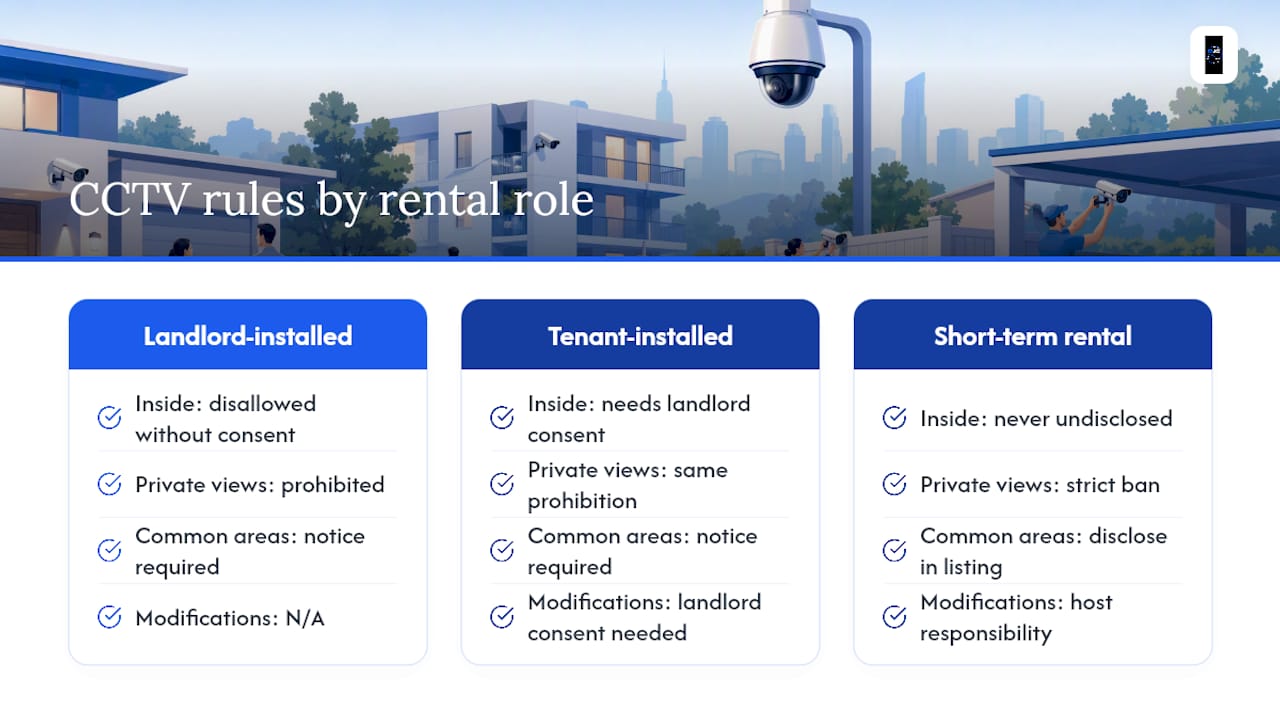
A landlord or property manager generally cannot install cameras inside a tenanted dwelling, or pointed into private areas like windows, without the tenant's knowledge and, in most cases, explicit agreement written into the lease or communicated in advance. Common areas of a rental, shared driveways, building entrances, or communal laundries, sit in a greyer zone, but tenants still need clear notice that cameras are operating and why.
Tenants who want to install their own cameras face a parallel issue: modifying a rental property (running cable, mounting hardware, drilling into external walls) typically requires landlord consent under most residential tenancy agreements, separate from the privacy question entirely. A tenant is also bound by the same state surveillance laws as anyone else, so a doorbell camera that happens to capture a neighboring unit's front door in a duplex or townhouse arrangement needs the same masking consideration as any other installation.
Short-term rentals (Airbnb-style properties) carry their own specific expectation: undisclosed cameras inside a rented dwelling, even common living areas, are widely treated as a serious breach of guest privacy and, depending on placement, can cross into criminal surveillance territory. Any camera on a short-term rental property needs to be disclosed to guests before booking, typically in the listing itself, and should never cover bedrooms, bathrooms, or similar private spaces regardless of the host's stated security rationale.
For anyone renting out or managing a residential property, the safest approach is to keep cameras confined to exterior common areas, disclose them clearly in lease documentation or listings, and treat interior surveillance as off-limits unless there's explicit written agreement covering the exact placement.
How CCTV Affects Visitor and Customer Privacy Rights
Every person who walks past a camera at your business, customer, delivery driver, or passerby, has a stake in how that footage gets handled, even though they never agreed to a service contract with you.
Under the APPs, a customer captured on a business's CCTV has the same access rights as an employee would: they can request to see footage of themselves, and the business must respond within a reasonable timeframe, redacting any other identifiable people who appear in the same footage. This becomes operationally significant for businesses with high foot traffic, retailers, medical clinics, gyms, because a single access request can require reviewing hours of footage to isolate and redact one individual's appearance.
Signage does double duty here: it satisfies the notification obligation under APP 5, and it also sets visitor expectations before they enter a monitored space. A sign that simply says "CCTV in operation" technically discloses recording, but the OAIC's stronger-practice guidance favors signage that also names the business operating the system and how to make a privacy inquiry, since that gives visitors a genuine path to exercise their rights rather than just a passive warning.
Businesses handling sensitive customer interactions, healthcare waiting rooms, financial service counters, legal offices, should think harder about camera placement than a typical retail floor. Capturing a customer's face at a reception desk is standard security practice; capturing what's visible on a screen they're looking at, or audio of a conversation with staff, raises the compliance bar considerably and often isn't justified by the security purpose at all.
How to Run a Privacy Impact Assessment for a CCTV System
A privacy impact assessment (PIA) sounds like a big formal exercise, but for most businesses it's really a structured set of questions answered honestly before cameras go up, not after a complaint arrives.
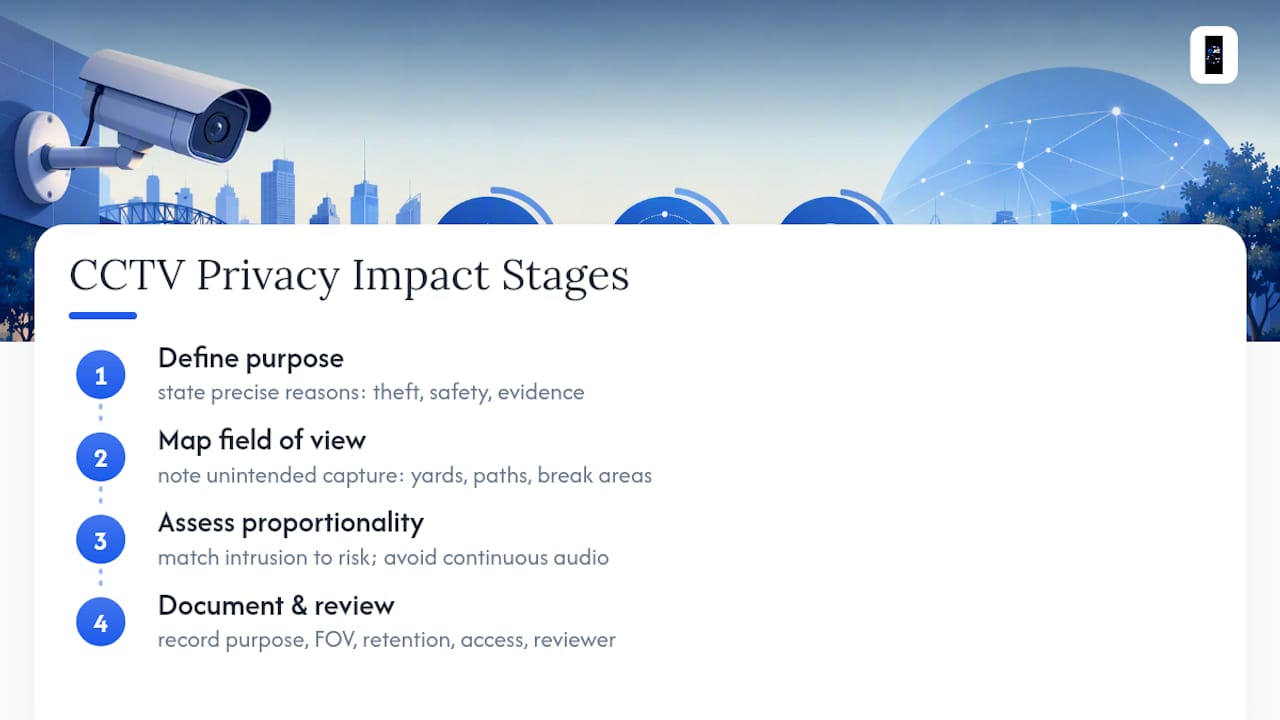
Start with purpose: write down, specifically, why each camera exists (theft prevention, safety monitoring, incident evidence) rather than a blanket "security" justification. A vague purpose makes it much harder to justify retention periods or access decisions later, and regulators tend to ask exactly this question first.
Next, map what each camera actually captures. Walk the property with the installed field of view in hand and note every instance where a lens captures more than intended, a neighboring yard, a public footpath, an area where staff take breaks. This step alone resolves a large share of privacy complaints before they happen, because most problems come from cameras capturing more than their stated purpose requires, not from malicious intent.
Then assess proportionality: does the privacy intrusion match the actual risk being addressed? A single camera on a cash register is proportionate to theft risk. Continuous audio recording throughout a retail floor, capturing every customer conversation, usually isn't proportionate to that same risk and invites exactly the kind of consent problem covered earlier.
Finally, document your findings, purpose, field of view, retention period, access controls, and who reviewed it, and revisit that document whenever you add a camera, change its position, or expand its purpose. Businesses that fold this into their initial installation planning, rather than treating it as a compliance afterthought, tend to avoid the costliest fixes: retrofitting masking, rewriting a privacy policy under pressure, or responding to a regulator inquiry with no paper trail at all.
Best Practices for Reporting a CCTV Data Breach
A CCTV data breach isn't always a dramatic hack. It's often something mundane: an unencrypted hard drive left in a skip, a shared login that never got revoked after an employee left, or footage accidentally emailed to the wrong recipient during an access request.
Once an organisation covered by the Privacy Act becomes aware that CCTV footage containing personal information has been accessed, disclosed, or lost without authorization, and that access is likely to result in serious harm, it may trigger notification obligations under the Notifiable Data Breaches scheme tied to the Privacy Act. The immediate steps matter more than the paperwork that follows.
Contain the breach first: revoke the compromised credential, retrieve or delete the misdirected file, or secure the physical device. Then assess the scope, how much footage was exposed, how many people are identifiable in it, and whether the exposure is ongoing. Document this assessment as you go rather than reconstructing it later, since regulators and any affected individuals will want a clear timeline.
Where the breach is likely to cause serious harm, affected individuals need to be notified in plain language about what happened, what information was involved, and what steps they can take to protect themselves. The OAIC also needs to be notified in qualifying cases. Businesses that already have a documented incident response plan, decided in advance rather than improvised during a crisis, consistently handle this faster and with fewer follow-up complaints, because the hard decisions (who to notify, how fast, in what format) were already made before anything went wrong.
Balancing Security and Privacy in Real Installations
Most privacy complaints trace back to installation shortcuts, not bad intentions. A camera aimed a few degrees too wide, a microphone left on by default, no signage because it felt unnecessary for a small business. DJC Engineering designs systems across South East Queensland with these risks built into the placement and configuration from day one, not bolted on afterward. Getting a site-specific assessment before installation is the cheapest compliance step you'll ever take.
— Dylan
Get a Compliant CCTV System Installed the Right Way
Generic advice only gets you so far when your driveway, your shopfront, or your staff break room all have different privacy considerations. Professional installers design and install 4K CCTV systems with compliance built into the placement and configuration from the first site visit, not added as an afterthought once something's already wrong.

Every installation is scoped, installed, and configured by a licensed team, without using subcontractors, which ensures consistency and accountability throughout the process. That matters when you're trying to avoid a neighbor's window or keep a workplace camera out of a break room: it's one accountable team, not a chain of finger-pointing if something's off after handover.
Djcengineering's NYX Security Camera Systems cover compliant camera placement and audio configuration, while network security through segmented, professionally installed infrastructure protects stored footage the way APP 11 expects. For access control and intercom setups that complement a CCTV system, the access control and intercom page covers what's available.
If you're planning a new system or want an existing one reviewed for privacy exposure, request a security enquiry and get a site-specific assessment before you install anything.
Sources
- Security cameras — Office of the Australian Information Commissioner (OAIC)
- Surveillance Devices Act 2016 (SA) — South Australian legislation
- Business
- Privacy Act 1988 — Federal Register of Legislation
FAQ
Can My Neighbor Point a CCTV Camera at My House?
A neighbor can generally point a camera toward shared boundaries or their own property, but deliberately capturing your windows, backyard, or private activities can breach state surveillance laws; the IPC NSW recommends raising it directly with them first, then mediation if that fails.
Can My Employer Watch Me on CCTV in Australia?
Yes, but employers must follow jurisdiction-specific notice and consultation rules, New South Wales requires 14 days' written notice and signage, while the ACT requires 14 days of genuine consultation, and cameras generally cannot be placed in bathrooms or break rooms.
Is CCTV Legal on Private Property in NSW?
Yes, CCTV is legal on private property in New South Wales for both homeowners and businesses, provided it doesn't capture private activities on someone else's property and, for audio, complies with the state's listening devices consent rules.
Do I Need a Privacy Policy for a Home Security Camera?
No, individuals operating CCTV in a private, household capacity generally fall outside the Privacy Act's requirements, but a privacy policy becomes necessary once an organisation, including many small businesses, operates the system.
Can Djcengineering Help Make My CCTV System Compliant?
Yes, Djcengineering designs and installs CCTV systems across South East Queensland with compliant camera placement, audio configuration, and secure networking built in; current service details are available on the NYX Security Camera Systems page.