

For most construction managers, the right setup is a mixed deployment: rugged cellular/solar cameras covering the perimeter and entry points, plus fixed PoE/4K units aimed at critical progress zones and BIM overlay positions. That combination gives you persistent coverage without depending on site power or Wi-Fi, and it produces the forensic-quality footage you need for insurance claims, subcontractor disputes, and OSHA incident reviews.
Three approaches worth requesting quotes on right now:
- Managed turnkey platforms (OxBlue is the flagship name here): enterprise-grade, time-lapse-ready, and fully supported. Best for long-duration, high-profile projects where documentation is as important as security.
- Rugged cellular/solar kits (VOSKER leads this category): off-grid, relocatable, and live in under an hour. Best for remote sites, rural highways, and any project without reliable power.
- Budget PoE/DIY bundles (Reolink is the most recognized option): wired, high-resolution, and cost-effective for smaller sites with existing network infrastructure.
When you call the first vendor, ask two things immediately: what data plan is included, and whether the hardware is available for your project start date. Lead times on managed platforms can run four to six weeks.
IP67-rated housings are the minimum for outdoor jobsite use. OSHA's incident-investigation standards mean your footage retention policy matters as much as your camera count.
Table of Contents
- Which construction site camera approach fits your project?
- How to choose the right cameras for your jobsite
- What deployment model fits your project timeline?
- Why centralized monitoring and crew transparency are the expert standard
- The real ROI from jobsite cameras goes beyond theft prevention
- Worker privacy and U.S. legal basics for construction site cameras
- OxBlue, VOSKER, and Reolink: which approach fits your site?
- Pre-bid technical checklist and installation tips
- Key Takeaways
- The case for treating cameras as infrastructure, not afterthoughts
- Djcengineering handles the installation so you can focus on the project
- Useful sources for procurement teams
Which construction site camera approach fits your project?
The three vendor approaches below cover most jobsite scenarios. None of them is universally "best" — the right one depends on your site's power situation, project duration, and how much of the monitoring you want to own versus outsource.
| Approach | Best for | Connectivity & power | Installation model | Key features | Storage & monitoring | Typical cost shape |
|---|---|---|---|---|---|---|
| Enterprise managed platform (e.g., OxBlue) | Long-term, high-profile projects needing time-lapse and stakeholder reporting | Wired or cellular, AC power preferred | Managed/turnkey — vendor installs and maintains | 4K time-lapse, analytics, tamper protection, stakeholder portals | Cloud subscription with long retention | High upfront hardware + monthly service fee |
| Cellular/solar off-grid units (e.g., VOSKER) | Remote sites, short-term projects, no power or Wi-Fi | Solar + internal battery + LTE/4G | Self-install or dealer-assisted | Full-color night vision, motion alerts, relocatable | Cloud subscription, some local SD card | $600–$900 per camera; $15–$40/month data plan |
| Budget PoE/DIY kits (e.g., Reolink) | Smaller sites, phased installs, existing network | PoE over Cat6, wired power | Self-install | 4K resolution, local NVR, basic analytics | Local NVR + optional cloud | $3,000–$6,000 for a mid-site kit before installation |
Price-range callout:
- Single LTE/solar camera: $600–$900 hardware, plus $15–$40/month for a cellular data plan
- Mid-site kit (4–8 cameras, PoE): $3,000–$6,000 hardware before installation labor
- Managed turnkey deployment: significantly higher, with monthly service fees covering monitoring, maintenance, and cloud storage — pricing is project-specific and quoted on request
The cellular/solar category has expanded fast. Solar-powered cellular cameras running on 4G/5G are now the standard recommendation for remote sites like wind farms, bridge construction, and rural highway projects — anywhere trenching power or pulling fiber is impractical.
How to choose the right cameras for your jobsite
Core specs that actually matter
Resolution and frame rate are the starting point, but they are not the whole story. A 4K camera recording at 1 frame per minute is a time-lapse tool. The same camera at 15–30 fps is a forensic evidence tool. Know which you need before you spec anything.
Low-light performance separates cameras that work from cameras that look good in a brochure. Full-color night vision and on-camera AI reduce false alarms and deliver usable footage after dark — infrared-only cameras produce grainy, monochrome images that are often inadmissible or inconclusive in claims.
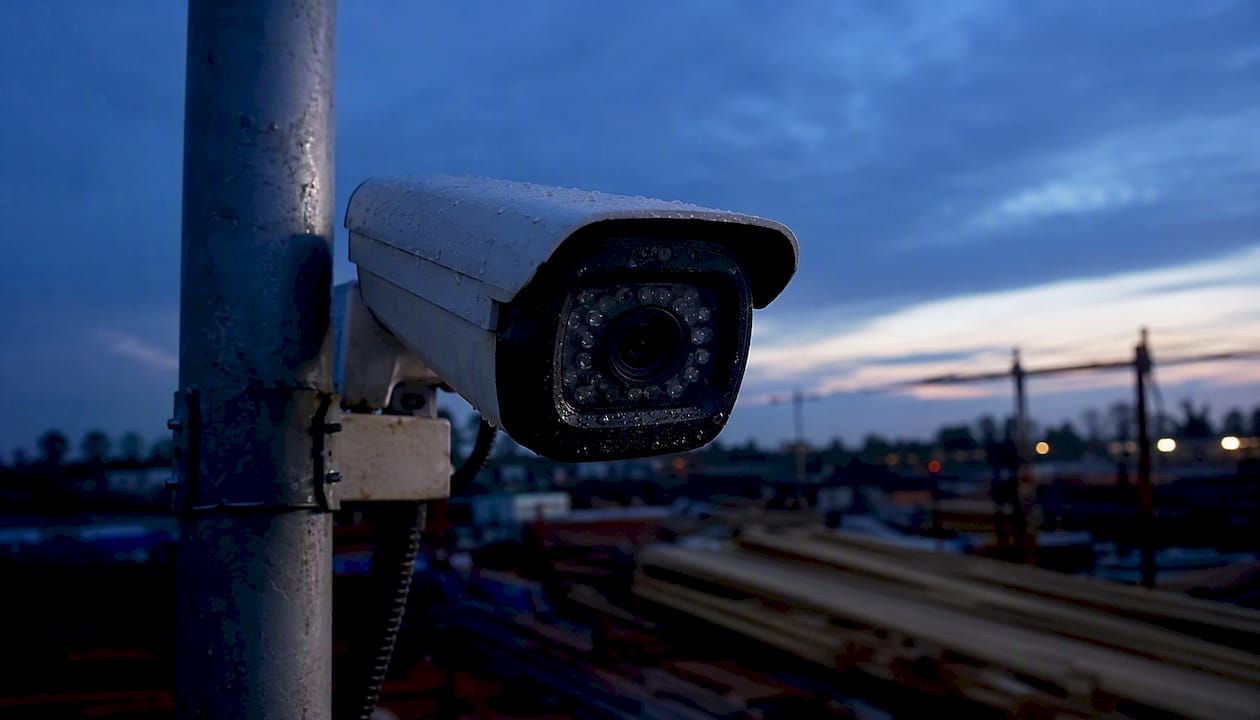
IP rating is non-negotiable outdoors. IP67 means the housing is dust-tight and survives temporary submersion. IK10 adds impact resistance against vandalism. For high-theft-risk sites, look for both. Tamper detection (tilt sensors, cable-cut alerts) adds another layer.
Onboard analytics — PPE detection, license plate recognition, intrusion zone verification — let you cut false alarms and trigger active deterrence (strobes, two-way audio, sirens) where local ordinances allow.
Connectivity and power trade-offs
Cellular (LTE/5G): Works anywhere with a signal. Monthly data costs add up fast if you run continuous 4K. Use motion-triggered recording or scheduled snapshots to manage data consumption. Best for remote or temporary sites.
Wi-Fi: Convenient but fragile on active construction sites. Signal drops when steel goes up, and interference from equipment is common. Use only as a secondary backhaul where wired runs are impractical.
PoE (Power over Ethernet): The most reliable option for fixed installs. One Cat6 cable delivers power and data. Pairs naturally with an on-site NVR for local storage. Requires cable routing and a network switch, so plan for it in your site infrastructure budget.
Solar + battery: Pairs with cellular for fully off-grid deployment. Size the panel and battery bank for your site's worst-case sun hours. Most vendor kits are pre-sized for average conditions — verify for northern latitudes or heavily shaded sites.
Storage and retention
A local NVR keeps footage available during connectivity outages. Cloud backup handles long-term retention and remote access. A hybrid approach — local microSD or on-device SSD plus cloud — is the practical standard for jobsite cameras because it covers both failure modes.
Retention period matters for legal reasons. Most insurance claims and OSHA investigations require footage from 30–90 days prior to an incident. Set your retention policy before you sign a cloud subscription, and confirm the export format (MP4 with metadata, not proprietary) before you need it.
Vendor evaluation checklist
When comparing quotes, push vendors on these specifics:
- SLA response time for camera outages (target: 4-hour remote, 24-hour on-site)
- Warranty terms and who owns the hardware at project end
- Integration with your PM or BIM platform (Procore, Autodesk Construction Cloud, or similar)
- Scalability: can you add cameras mid-project without re-contracting?
- References from projects of similar size and duration
Pro Tip: When specifying continuous 4K at 30 fps, storage and bandwidth requirements jump dramatically compared with snapshot-based systems. A single 4K/30fps stream can consume 50–100 GB per day. Plan your NVR capacity and cellular data plan around that figure, not around the camera's marketing sheet.
What deployment model fits your project timeline?
The four main deployment patterns
Temporary mobile units (trailer, tower, or all-in-one enclosure) are the fastest to deploy. Mobile surveillance units running on solar-battery power and 4G/5G can go live in 30–60 minutes with no trenching or fixed infrastructure. They are ideal for site mobilization, before permanent power is established, or for covering a specific high-risk phase.
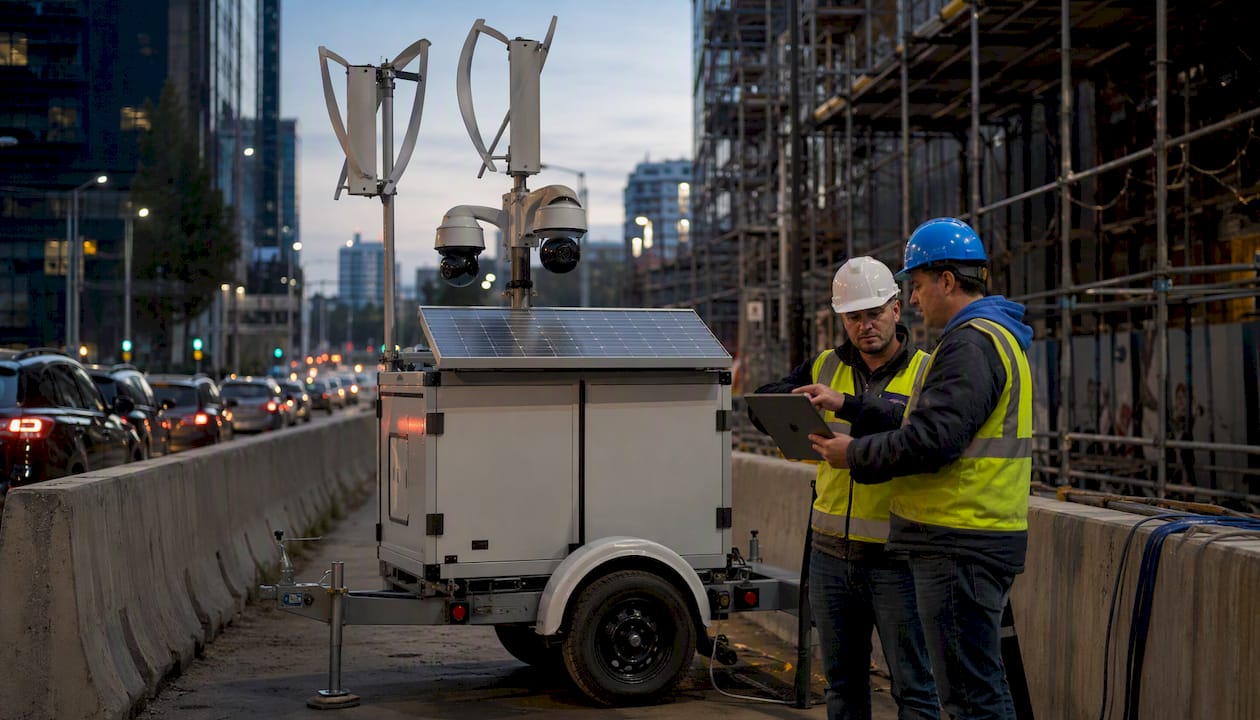
Short-term solar/cellular kits are the step between a mobile unit and a permanent install. You mount them on a pole or fence post, aim them at the perimeter, and leave them for the project duration. Relocatable if the site layout changes.
Fixed PoE/AC permanent installs are the right call for long-duration projects or sites with existing network infrastructure. Higher upfront cost, but the image quality and reliability are better than any wireless alternative. These pair naturally with an on-site NVR and structured cabling.
Hybrid managed systems combine fixed progress cameras with relocatable security units under a single monitoring platform. The vendor manages both, which reduces your team's operational load but increases monthly cost.
Installation checklist for bids
- Site survey: signal strength test at each proposed camera location (cellular and Wi-Fi if applicable)
- Mounting height and angle: minimum 10–12 feet for perimeter cameras, higher for progress capture
- Power provisioning: confirm AC availability or solar panel sizing
- Theft-resistant housings: tamper-evident mounts, security fasteners, cable conduit
- Cable routing plan for PoE runs (avoid areas with heavy equipment traffic)
- Cellular signal testing with the actual SIM carrier before committing to a data plan
Timelines vary by model. A mobile unit goes live the day it arrives. A solar/cellular kit takes one to two days including mounting and configuration. A fixed PoE system with structured cabling typically runs one to two weeks from site survey to go-live, depending on cable runs and NVR configuration.
Pro Tip: Stage your camera deployment to match construction phases. Start with high-visibility deterrent units at the perimeter during site clearing and foundation work — that is when theft risk peaks. As the structure rises, shift cameras inward to capture progress and structural milestones for time-lapse and BIM comparison.
Why centralized monitoring and crew transparency are the expert standard
The most effective jobsite camera programs do not treat security and progress documentation as separate systems. Centralizing fixed cameras, drone flights, and 360° walkthroughs into a single timeline eliminates the fragmented records that create disputes and slow down claims. When every visual record lives in one platform, your project manager, owner, and insurer are all looking at the same evidence.
Integrating camera overlays with BIM allows automated detection of design deviations by comparing as-built imagery to the 3D model in near real-time. Catching deviations early prevents the kind of rework that blows schedules and budgets. A single caught deviation can justify an entire camera deployment's cost.
On the analytics side, programmable IoT cameras with on-camera AI can automate construction-phase detection, generate progress reports without manual review, and flag PPE violations or unauthorized access in real time. That shifts your team from reactive to proactive.
Worker transparency is not optional — it is the practice that keeps camera programs legally defensible and operationally effective. Post clear signage at all site entry points. Provide written notice explaining that cameras are used for safety, progress documentation, and site protection, not individual performance tracking. Transparent notice reduces worker concern and improves cooperation with safety protocols.
Djcengineering's 4K CCTV installations with AI integration and a high first-visit fix rate mean that the technical infrastructure for this kind of centralized, analytics-driven monitoring is available as a professional installation service — not just a vendor-supplied kit you configure yourself.
Pro Tip: Map each camera's field of view into your BIM model during the site survey phase. That alignment makes automated deviation detection practical and gives your project team a spatial reference for every piece of footage.
The real ROI from jobsite cameras goes beyond theft prevention
The most common misconception about construction site cameras is that they are a theft-prevention tool. They are that, but the higher-value use cases are operational.
Top use cases:
- Equipment and material theft reduction: Construction theft losses are reported in the $300M–$1B range annually in industry literature, with low recovery rates. Visible cameras with active deterrence (strobes, sirens, two-way audio) reduce opportunistic theft significantly.
- Time-lapse progress reporting: Automated time-lapse compresses months of construction into minutes. Owners and stakeholders get visual proof of schedule adherence without site visits.
- Safety incident review: Footage from the minutes before an incident is often the only objective record. It protects you in OSHA investigations and insurance claims.
- Delivery coordination: Live feeds let site managers confirm material deliveries without being physically present at the gate.
- Weather impact documentation: Time-stamped footage of weather events supports force majeure claims and schedule extension requests.
KPIs worth tracking:
- Incident response time (from alert to on-site response)
- Recovery rate for stolen items (cameras with LPR improve this)
- Reduction in unnecessary site visits by project managers and owners
- Dispute resolution time (footage-backed disputes close faster)
- Hours saved per week on manual progress reporting
Consider a mid-size commercial project where the owner required weekly progress photos submitted by the GC. After installing fixed progress cameras with automated time-lapse, the GC eliminated four hours of weekly photography and report compilation. The camera system paid for itself in reduced labor before the project reached structural steel.
Worker privacy and U.S. legal basics for construction site cameras
U.S. law does not have a single federal statute governing construction site surveillance, but several overlapping frameworks apply. Here is what you need to address before cameras go live:
- Notice and signage: Post visible signs at all site entry points stating that video surveillance is in use. Include the purpose (safety, security, and project documentation).
- Limited-purpose statements: Document in writing that footage will be used only for the stated purposes. Avoid language that implies individual performance monitoring.
- Avoid private areas: Never install cameras in restrooms, changing areas, or designated break rooms. Courts and state regulators treat these as areas with a reasonable expectation of privacy regardless of the employment context.
- Audio recording: Many states require all-party consent for audio recording. If your cameras have two-way audio or microphones, check your state's wiretapping statute before activating audio capture.
- OSHA intersection: OSHA does not prohibit safety cameras, and footage from incident investigations is generally permissible. However, OSHA's anti-retaliation provisions mean footage must not be used to discipline workers for reporting injuries or safety concerns.
- State-level monitoring laws: California, Illinois, and New York have stricter employee monitoring rules than the federal baseline. If your project is in one of these states, review the applicable statute or consult employment counsel before deployment.
- Document your justification: Keep a written record of why each camera location was chosen, what it covers, and who has access to footage. That documentation is your first line of defense in any privacy challenge.
This is general information, not legal advice. Confirm current rules with a qualified employment attorney or your state's labor authority before deploying cameras on active worksites.
OxBlue, VOSKER, and Reolink: which approach fits your site?
OxBlue: managed enterprise platform
OxBlue targets long-term, high-profile construction projects where time-lapse documentation and stakeholder visibility are as important as security. The platform is fully managed: OxBlue handles installation, maintenance, and cloud hosting. Clients get a web portal with time-lapse playback, live streaming, and project milestone tracking. The trade-off is cost — OxBlue is among the more expensive options, and pricing is project-specific. Best for: commercial developers, public infrastructure projects, and GCs who need to deliver visual progress reports to owners or lenders.
VOSKER: rugged cellular/solar for off-grid sites
VOSKER's hardware is built for sites with no power and no Wi-Fi. The cameras run on solar panels and internal batteries, connect via LTE, and are designed to be mounted and moved without tools. Motion-triggered alerts and cloud storage are standard. The limitation is resolution and analytics depth compared with managed platforms — VOSKER is a security-first product, not a progress-documentation platform. Best for: remote sites, short-duration projects, and perimeter coverage where relocatability matters more than image quality.
Reolink: flexible and budget-conscious
Reolink offers both battery/solar and PoE models, which makes it the most flexible option for phased installs. The PoE lineup delivers genuine 4K resolution with local NVR storage — a strong value for smaller sites with existing network infrastructure. The self-install model means you own the configuration and maintenance. Cloud subscription is optional, not required. Best for: smaller GCs, owner-builders, and security managers who want professional-grade image quality without a managed-service contract.
Pre-bid technical checklist and installation tips
Before you send an RFP or accept a vendor quote, run through these items:
- Cellular signal test at each proposed camera location (use the actual carrier SIM, not a generic signal map)
- Mounting height confirmed (minimum 10–12 feet for perimeter; higher for progress capture)
- Required IP rating documented (IP67 minimum; IP68 or IK10 for high-vandalism risk)
- Frame rate and resolution targets specified (time-lapse vs. continuous forensic recording)
- Retention period confirmed (30 days minimum; 90 days for high-risk sites)
- Evidence export format specified (MP4 with embedded metadata, not proprietary)
- Power plan confirmed (AC, PoE, or solar panel sizing with battery bank capacity)
- SLA response times written into the contract (4-hour remote, 24-hour on-site as a baseline)
- Camera uptime threshold specified (99% monthly uptime is a reasonable contractual target)
Pro Tip: For theft-resistant mounting, use tamper-evident security fasteners and run cables inside rigid conduit or within the structure wherever possible. A camera that can be unbolted in 90 seconds is not a deterrent — it is inventory for a thief. Pair physical security with remote health monitoring so you get an alert the moment a camera goes offline.
Three installation practices that separate professional installs from DIY:
- Lock the microSD and enclosure. Use cameras with locking card slots and housings that require tools to open. An unlocked SD card is an easy evidence wipe.
- Set up health monitoring from day one. Configure remote alerts for camera offline events, power loss, and storage failures. You should know a camera is down before your crew does.
- Document acceptance criteria in the contract. Specify uptime thresholds, image quality standards, and SLA response times before signing. Verbal commitments do not hold up when a camera has been offline for three days.
Key Takeaways
A mixed deployment of cellular/solar perimeter cameras and fixed PoE/4K progress cameras gives most U.S. construction sites the best balance of coverage, evidence quality, and cost control.
| Point | Details |
|---|---|
| Mixed deployment wins | Combine cellular/solar perimeter units with fixed PoE/4K cameras for coverage without depending on site power or Wi-Fi. |
| Cost ranges to budget | Single LTE/solar cameras run $600–$900 hardware plus $15–$40/month; mid-site PoE kits cost $3,000–$6,000 before installation. |
| Storage policy first | Set a 30–90 day retention period and confirm MP4 export format before signing any cloud subscription. |
| Privacy and notice required | Post signage, provide written notice, and avoid private areas before cameras go live on any U.S. worksite. |
| Djcengineering for professional installs | Djcengineering delivers licensed 4K CCTV with AI integration and a high first-visit fix rate for sites needing a managed, accredited installation. |
The case for treating cameras as infrastructure, not afterthoughts
The projects where camera systems deliver the most value are the ones where the decision was made at mobilization, not after the first theft or the first disputed progress claim. By the time a manager is scrambling to install cameras reactively, the site has already absorbed the cost the cameras were supposed to prevent.
What most articles on this topic understate is how much the operational use cases outweigh the security use cases in terms of dollar return. Theft prevention is real, but the hours saved on progress reporting, the disputes avoided because footage existed, and the rework prevented by early deviation detection — those are the numbers that show up in project post-mortems. A camera system that feeds a BIM overlay and automates weekly owner reports is not a security expense. It is a project management tool that happens to also deter theft.
The other thing worth saying plainly: the managed-versus-DIY decision is not just about budget. It is about who owns the problem when a camera goes offline at 2 AM the night before an insurance adjuster visits. A managed platform with a real SLA means someone else owns that problem. A self-installed kit means you do. Neither answer is wrong — but be honest about which one fits your team's capacity before you sign anything.
Djcengineering handles the installation so you can focus on the project
If you have read this far, you know what a well-specified camera system looks like. The harder part is getting it installed correctly, integrated with your site network, and configured to actually deliver the footage quality and retention you need when it matters.

Djcengineering designs and installs licensed 4K CCTV systems with AI capabilities, structured cabling, and managed network infrastructure for commercial and construction sites. The 98% first-visit fix rate means the system works from day one — no return visits to fix a misconfigured NVR or a camera that was mounted at the wrong angle. No subcontractors. No handoffs.
For sites that need PoE infrastructure, structured cabling and network design is part of the same engagement — not a separate contract with a separate vendor. For sites that need a full security package including alarms and access control, the CCTV, alarms, and access control service covers it under one scope.
Request a site survey and technical quote at djcengineering.com.au.
Useful sources for procurement teams
These sources are worth bookmarking when you are building RFPs, comparing specs, or briefing stakeholders:
- Evercam — Construction Site Cameras and Fixed Monitoring: Useful for understanding fixed-position camera deployments, time-lapse examples, and single-timeline platform approaches. Request their spec sheets for retention and export format details.
- NICB — National Insurance Crime Bureau: Background on construction theft trends and recovery rates. Useful for building the business case internally or with insurers.
- AGC — Associated General Contractors of America: Industry guidance on jobsite safety, technology adoption, and workforce practices relevant to camera deployment policies.
When engaging any vendor, always request the full spec sheet, SLA document, and at least two references from projects of comparable size and duration before committing.
Recommended
- Video Surveillance Security Cameras: The Technical Guide to Modern Property Protection | DJC Engineering
- Commercial CCTV Security: A Professional Guide to High-Performance Surveillance | DJC Engineering
- Security Systems Gold Coast: The 2026 Buyer’s Guide to Integrated Protection | DJC Engineering
- Security Camera Installation Gold Coast: High-Performance Surveillance Engineering | DJC Engineering