
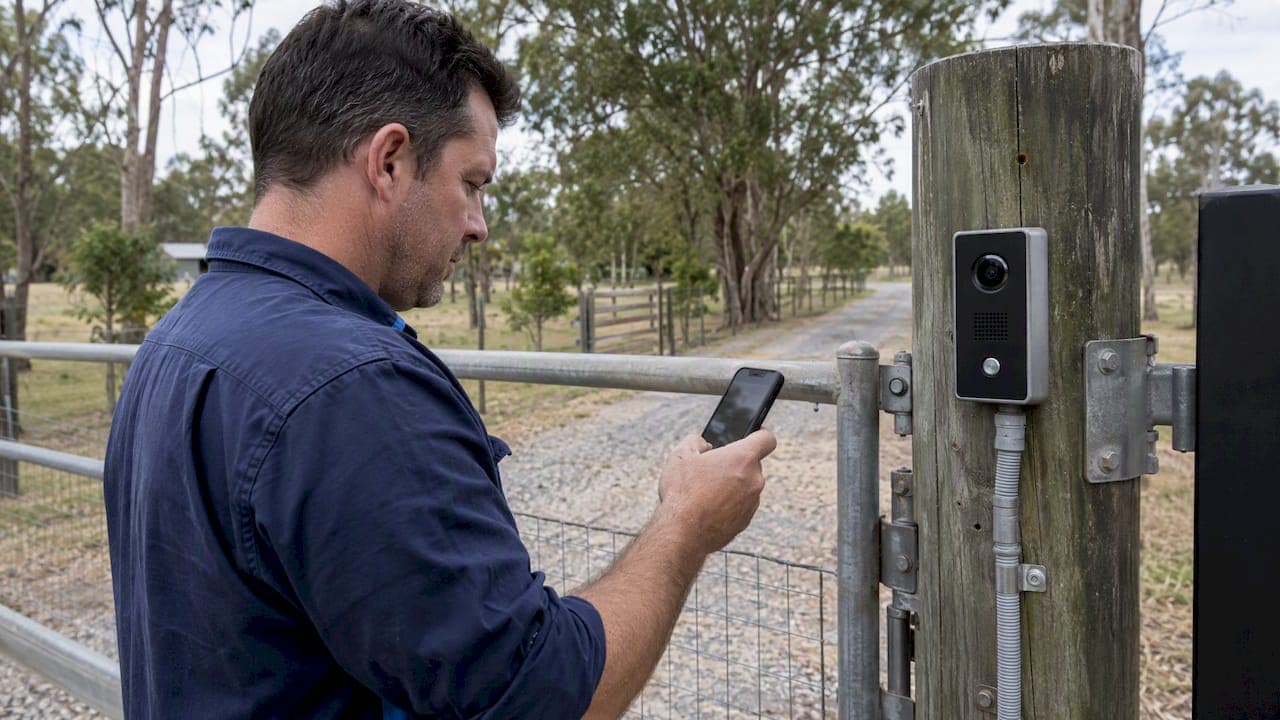
An IP video intercom is a networked door or gate station that gives you live video, two-way audio, and remote unlocking through a monitor or mobile app. It fits anywhere visual verification, an audit trail, or integration with other security systems matters: long driveways, multi tenant buildings, retail entries and family homes that want to see who's calling before opening the door.
TL;DR:
- For remote gates, cellular avoids trenching but requires a signal test and recurring fees; Ethernet runs beyond 100 meters need an extender or switch.
- Choose at least 2MP for faces, 4K for wide approaches where number plates matter, and WDR for backlit entrances; ask for a measured lux rating.
- Check IK08 to IK10 vandal ratings for public entries; exposed gates need IP65 or higher, while SIP and ONVIF support broadens integration options.
- Accredited installers should test the gate relay during power loss, verify network isolation and encryption, and provide a commissioning log and network diagram at handover.
- Installation often costs more than hardware, especially when trenching is required; cellular and cloud storage can add recurring fees, so demand itemized quotes.
Table of Contents
- What Components Make Up an IP Video Intercom System
- Which Technical Specs Matter When Comparing Datasheets
- How Connectivity Choices Map to Real Sites
- Australian Installation Standards and Network Security
- Choosing the Right Setup for Your Property
- What Professional Installers Catch That DIY Often Misses
- Buying and Spec Checklist Before You Sign a Quote
- Why I'd Rather See This Installed Than Guessed At
- Getting an IP Video Intercom Installed Properly
- FAQ
- Sources
What Components Make Up an IP Video Intercom System
Every IP video intercom system is built from a handful of parts, and understanding each one helps you read a quote or a datasheet without getting lost in marketing language.
The outdoor door station is the visible hardware: a weatherproof unit with a camera, microphone, speaker and call button, mounted at the gate or front door. Many stations add an optional credential reader, a keypad, RFID tile or fingerprint sensor, so a resident or employee can enter without a phone or a monitor. Premium units such as the Axis I8307-VE combine a high resolution camera with an integrated access reader and a hardware security platform, which suits sites that need both video verification and card access in one housing.
Inside, you'll either have a dedicated indoor monitor, a SIP-compatible app on a smartphone, or both. The monitor gives an always-on display near the entry, useful in a family home or a reception area, while a mobile app lets you answer the door from anywhere there's a signal, which matters for rental properties, offices and anyone who travels.
Power and network infrastructure sit behind the scenes but decide how reliable the whole system is. Most door stations run on Power over Ethernet, pulling both data and power from a single cable back to a PoE switch or injector. Where cabling isn't practical, a dedicated power supply and a wireless bridge take over, with trade-offs covered in the next sections.
Rounding out the kit:
- Mounting boxes and rain shields protect the station and keep its IP rating intact in exposed locations.
- Relays translate the intercom's unlock signal into something a gate operator, maglock or strike plate understands.
- Gate operator interfaces let the intercom trigger an existing automatic gate without rewiring the whole system.
- Surge protection on outdoor runs guards against lightning induced damage, especially on long cable runs to a gate.
A basic single door residential kit might only need a station, a monitor or app license, and a PoE injector. A gated property or a multi tenant building adds relays, a managed switch, and often a second or third door station for side entries or parcel rooms.
Which Technical Specs Matter When Comparing Datasheets
Datasheets lean heavily on marketing terms, so it helps to know which numbers actually predict real world performance.
Resolution and field of view decide how much usable detail you get. A 2MP (1080p) sensor is a reasonable minimum for reading a face at the door; 4K sensors help on wider gate approaches where you need to capture a number plate as well as a visitor's face. Wide dynamic range (WDR) matters more than raw resolution in backlit entries, since it stops a bright sky from turning a visitor into a silhouette. "Night vision" on a spec sheet can mean anything from a basic infrared LED with a short range to a genuine low-light sensor; ask for the actual lux rating rather than trusting the label.
Compression and frame rate affect both image smoothness and storage. H.265 compression halves file sizes compared with H.264 at similar quality, which matters if you're recording continuously rather than on motion.
Audio quality is easy to overlook and often the weak point of budget units. Look for full-duplex audio (so both sides can talk at once, like a phone call, instead of walkie-talkie style), a stated SPL (sound pressure level) for the speaker, and echo cancellation, which keeps a conversation intelligible near traffic noise or an echoed entryway.
Environmental ratings decide where a station can physically live:
- IP65 or higher suits an exposed gate station facing weather directly.
- IP54 can be acceptable under a sheltered porch roof.
- IK08 to IK10 vandal resistance ratings matter for publicly accessible entries, car parks and commercial frontages.
Protocol support is what makes a system either open or locked to one vendor. SIP compatibility lets the intercom ring a standard SIP phone or app rather than a proprietary one. ONVIF support means the video stream can feed into a third-party VMS or NVR. On the security side, TLS and SRTP encrypt the signaling and the media stream, and 802.1X support lets the device authenticate onto a managed network rather than sitting open on the LAN, a distinction covered by the installer training unit CPPSEC3024, which specifies network security and AS/NZS 62676 compliance as a core installer competency.
Installer competence, not just hardware specs, predicts how reliably a system performs over years, according to the national training register entries for advanced security equipment installation linked above. A well specified intercom poorly commissioned still fails.
How Connectivity Choices Map to Real Sites
The connectivity decision, more than any single spec, determines whether your intercom works reliably for years or becomes a recurring headache.
- Wired PoE delivers the most predictable performance: stable video quality, no monthly data fees, and power and data over one cable. The trade-off is installation cost, since trenching conduit to a gate 60 to 100 meters from the house can be the single biggest line item on a quote.
- Wi-Fi works when the outdoor access point genuinely reaches the install location with a strong, verified signal, not just a phone showing bars from the living room. A dedicated outdoor AP and an actual RF test at the mounting height beat guesswork every time.
- Cellular (LTE or 5G) is often the practical answer for a remote gate where trenching is impractical. Guidance on gate intercom connectivity notes that cellular avoids major trenching costs but introduces a recurring data plan and depends on carrier coverage at that exact spot, so an on-site signal test before committing is worth the extra day.
- Hybrid setups, often PoE as primary with a cellular failover module, protect against the single point of failure that worries commercial and high value residential sites the most.
Pro Tip: Before paying for cellular hardware, stand at the exact gate location with the carrier's own coverage checker and a phone on that network, not just a general signal bar reading from inside the house.
A quick connectivity assessment checklist before you commit to any path: confirm existing conduit or cable runs to the entry point, measure the actual distance for a PoE run against the 100 meter Ethernet limit (adding a PoE extender or switch partway if needed), test Wi-Fi signal strength at the mount height with a phone app, and check cellular coverage with the specific carrier you intend to use, not just general network maps. For businesses already managing a network, firms such as our partner at TechBug can advise on firewall and VLAN segmentation if the intercom is joining an existing office network rather than a fresh residential install.

Australian Installation Standards and Network Security
Compliance isn't paperwork for its own sake. It's what makes a recorded incident usable as evidence and what keeps an insurer satisfied that the system was installed to a recognized standard.
In Australia, installers working on advanced security equipment, including IP video intercoms, typically hold units such as CPPSEC3024 (install advanced technology security equipment and systems) and CPPSEC2023 (install video surveillance systems and equipment). These training register entries specify device positioning, secure network configuration, and applying the AS/NZS 62676 series of standards, which cover video surveillance system performance and installation practice, alongside AS/NZS 2201.1 for intruder alarm system requirements that often intersect with intercom and access control work.
Cabling work also carries licensing implications under ACMA rules, and getting it wrong isn't just a compliance footnote: unlicensed cabling work can void insurance claims and complicate using footage as evidence after an incident. Beyond the cabling itself, recorded material from any intercom overlooking a public area, a driveway, footpath or shared entry, needs to be handled in line with Australian CCTV and privacy guidance, which stresses fairness, a clear purpose for recording, and accountability for who can access stored footage.
On the network side, a properly commissioned intercom gets more than a power cable and a Wi-Fi password:
- VLAN separation keeps intercom and camera traffic isolated from the general office or home network.
- Secure SIP and ONVIF configuration closes default ports and disables unauthenticated access.
- Firmware management ensures the device isn't shipped with known vulnerabilities left unpatched.
- Certificate-based authentication replaces default passwords with something that can't be guessed from a product manual.
TechAssist's cybersecurity guidance for CCTV and access control makes the case plainly: enterprise-grade hardware configured with TLS and SRTP prevents the kind of unauthorized stream access that makes headlines when a cheap consumer camera gets compromised.
Finally, ask for documentation at handover: an as-installed network diagram, the retention period set for recorded footage, and who holds administrative access to the system after the installer leaves.
Choosing the Right Setup for Your Property
The right intercom configuration depends less on budget and more on three questions: how far is the entry from the nearest network point, how many people need to answer it, and what else does it need to talk to?
Start with the basics. A suburban home with the front door close to the router needs little beyond a PoE or Wi-Fi door station and an app. A property with a gate 50 meters or more down a driveway needs a real connectivity decision, usually PoE with conduit or cellular with a tested signal. An apartment building needs a multi tenant panel that can ring individual units and typically integrates with building access control. A commercial site adds requirements for vandal resistance, multiple simultaneous video streams, and integration with an existing access control platform.
| Property type | Recommended connectivity | Minimum spec focus | What drives cost |
|---|---|---|---|
| Suburban home, door near network | PoE or Wi-Fi | 2MP, WDR, basic app | Hardware, minor cabling |
| Long driveway or rural gate | PoE with conduit, or cellular | 2 to 4MP, IP65, relay for gate operator | Trenching distance, cellular data plan |
| Apartment or multi tenant building | PoE, structured cabling | Multi tenant panel, access control integration | Number of units, panel complexity |
| Commercial entry or retail frontage | PoE, managed network | 4K, IK08 to IK10, ONVIF/VMS integration | Integration scope, multiple stations |
Cost components break down fairly consistently across these scenarios: hardware is often the smallest line item, installation (trenching, conduit, electrician time) is frequently the largest for anything beyond a simple front door swap, and ongoing fees apply mainly to cellular data plans or cloud video storage subscriptions. Industry guidance on gate intercom projects notes that residential installed costs commonly land in the low thousands, with larger or more complex commercial projects running higher, and that cellular-connected video platforms typically carry their own monthly service fee on top of hardware.
Cellular or a hybrid failover setup is worth insisting on whenever an entry point is the only way in or out of a property and a connectivity failure would mean nobody can get past the gate at all, which is the scenario where a single point of failure costs more than the extra hardware.
What Professional Installers Catch That DIY Often Misses
A DIY intercom install can get a camera pointed at the right spot and a doorbell that rings a phone. What it usually skips is the commissioning work that decides whether the system still performs correctly six months later.
A proper commissioning process includes:
- RF signal testing at the actual mount height and location, not an assumption based on a nearby room.
- VLAN separation verification, confirming intercom traffic can't see or be seen by other devices on the network.
- SIP and SRTP verification, checking that audio and signaling are actually encrypted rather than just configured to appear that way.
- Relay and gate operator testing under real conditions, including a failure test to confirm the gate doesn't get stuck open or locked shut if power drops.
- Simultaneous stream load testing for multi tenant or commercial sites where several units might answer calls at once.
Pro Tip: Ask any installer for a copy of the test log or commissioning checklist before the job is marked complete, not just a verbal confirmation that "it's all working."
A professional quote worth paying for should include a site diagram showing cable runs and device locations, a specification sheet listing the exact hardware model numbers (not just "intercom system"), and a commitment to return if the first-visit configuration needs adjustment. TechAssist's guidance on CCTV and access control security points out that professional design work is what prevents the common DIY vulnerabilities, default passwords left unchanged, open ports, and unisolated network traffic, that turn a convenience device into a liability.
The long-term payoff of proper commissioning shows up less in day one performance and more in year two: firmware stays patched, the installer has a record of exactly what was configured, and a fault gets diagnosed against a known baseline instead of guesswork.
Buying and Spec Checklist Before You Sign a Quote
Before comparing supplier quotes, it helps to have a one-page checklist that strips out the marketing language and focuses on what actually differs between systems.
Spec items worth confirming on paper:
- Connectivity supported: PoE, Wi-Fi, cellular, or hybrid, and which one applies to your specific site.
- Power requirements: PoE class, injector or switch included, and backup power if the gate needs to open during an outage.
- Protocol support: SIP for calling, ONVIF for video integration, and confirmation of TLS and SRTP encryption.
- IP and IK ratings: matched to the actual mounting location, exposed or sheltered.
- Warranty length and what it covers: hardware only, or installation labor as well.
- Ongoing fees: cloud storage, cellular data plans, or app subscription costs stated clearly, not buried in fine print.
| Question to ask | Why it matters |
|---|---|
| What's the actual lux rating for night performance? | Separates real low-light capability from a marketing label |
| Is the video stream encrypted with TLS and SRTP? | Confirms the feed can't be intercepted on the network |
| What happens to the gate if power or network drops? | Reveals fail-safe versus fail-secure behavior |
| Is there a recurring data or cloud fee? | Affects total cost of ownership beyond installation |
| Can this integrate with existing access control or VMS? | Determines future flexibility without a full system swap |
Common red flags worth walking away from: a quote with no model numbers attached, a supplier who can't explain whether the unit supports ONVIF or SIP, vague answers about ongoing fees, and any installer unwilling to provide a test log after commissioning.
Why I'd Rather See This Installed Than Guessed At
Having spent time around enough intercom installs to see where they go wrong, the pattern is consistent: the hardware is rarely the problem, the network configuration is. A $300 door station commissioned properly on an isolated VLAN with encrypted signaling outperforms a $1,200 unit left on default settings with an open port facing the internet.
What tends to surprise people is how much of the long-term reliability comes down to decisions made in the first afternoon: whether the cellular signal was actually tested at the gate, not assumed from the house; whether the installer documented the configuration, or left it as tribal knowledge; whether the relay was tested under a real power failure scenario, not just a bench test. Accredited installation with a documented first-visit fix rate exists precisely because these details compound. Skip them once and the system still works. Skip them on every job and you get intercoms that fail quietly, inconsistently, and usually at the worst possible moment, like a delivery driver at the gate during a storm.
— Dylan
Getting an IP Video Intercom Installed Properly
If the technical checklist above has you leaning toward a professional install rather than a weekend project, that's exactly the gap we work in. We design, install and commission intercom systems using our own crew, which keeps the same people accountable from the site survey through to the final handover.

What we cover on a typical intercom project:
- Site survey and connectivity testing to confirm whether PoE, Wi-Fi or cellular suits your specific gate or entry.
- Access control and intercom system installation, including relay setup for existing gate operators.
- Structured cabling and PoE network work, so the intercom sits on a properly segmented, secure network rather than an ad hoc Wi-Fi connection.
A site survey leads to a fixed-scope quote with model numbers and cable runs specified up front, not a vague estimate that grows once the job starts.
FAQ
What is an IP intercom?
An IP intercom is a door or gate station that connects over a standard network (wired or wireless) rather than dedicated analog wiring, sending video and audio as digital data. This lets it integrate with apps, access control and other networked security devices in a way older analog intercoms cannot.
What are IP-based intercom systems?
IP-based intercom systems use internet protocol networking, the same type of connection a computer or smart TV uses, to carry video, audio and unlock commands between a door station and an indoor monitor or mobile app. They typically support standards like SIP for calling and ONVIF for video, which keeps them interoperable with other security equipment rather than locked to one brand.
What is the best video intercom for a home?
The best choice depends on your entry's distance from the network and how many people need to answer calls, rather than one universal product. A PoE-connected station with a 2MP or higher sensor, WDR, and a mobile app covers most suburban homes well, while a long driveway typically calls for cellular or hybrid connectivity with a tested signal at the gate.
What is the best home intercom system?
There's no single best system across every property, since a home close to the router has different needs than one with a remote gate. A system that supports encrypted video (TLS and SRTP), has a verified IP rating for its mounting location, and was commissioned by an accredited installer tends to outperform an unmonitored DIY setup regardless of brand.