

Most Australian households should start at NBN 50, and step up to NBN 100 if two or more people regularly stream, game, or work from home at the same time. The tier label is just a ceiling, though. What actually determines your evening experience is the Typical Evening Speed (TES) your retailer publishes, not the maximum advertised figure.
Here is a quick-reference list of the current NBN speed tiers:
- NBN 12 (Home Basic I): 12 Mbps down / 1 Mbps up
- NBN 25 (Home Basic II): 25 Mbps down / 5 Mbps up
- NBN 50 (Home Standard): 50 Mbps down / 20 Mbps up
- NBN 100 (Home Fast I/II): 100 Mbps down / 20 or 40 Mbps up
- NBN 250/500 (Home Superfast): up to 500 Mbps down / 50 Mbps up
- NBN 750 (Home Ultrafast): up to 750 Mbps down / 50 Mbps up
- NBN 1000 (Home Ultrafast/Hyperfast): up to 1,000 Mbps down / 50 Mbps up
- NBN 2000 (Home Hyperfast): the fastest speed tier currently offered, providing very high download and upload capacities
Before you buy anything, check whether your address can actually access the tier you want, then compare TES figures between retailers on that tier. Two plans with the same tier label can deliver very different real-world speeds depending on how much shared bandwidth the retailer has purchased.
Pro Tip: Run a speed test at 8 PM on a weeknight after you sign up. If the result is well below the retailer's published TES, you have grounds to escalate or switch.
Key Takeaways
Choosing the right NBN tier comes down to concurrent demand, your connection technology, and the Typical Evening Speed your retailer actually delivers, not the headline maximum.
| Point | Details |
|---|---|
| Size by concurrent users | Allow roughly 25 Mbps per heavy user, add 5 Mbps for smart-home devices, then round up to the next tier. |
| TES beats the tier label | Compare retailers' published Typical Evening Speed and verify against ACCC Measuring Broadband Australia data before buying. |
| Technology limits your options | FTTP and HFC access tiers up to NBN 2000; FTTN, FTTC, and FTTB typically top out at NBN 100. |
| Watch ongoing pricing | Introductory discounts often mask higher ongoing costs; always ask for the post-discount monthly price. |
| Djcengineering fixes the last mile | Professional site surveys, structured cabling, and mesh Wi-Fi installs in South East Queensland resolve home-network bottlenecks that tier upgrades alone cannot fix. |
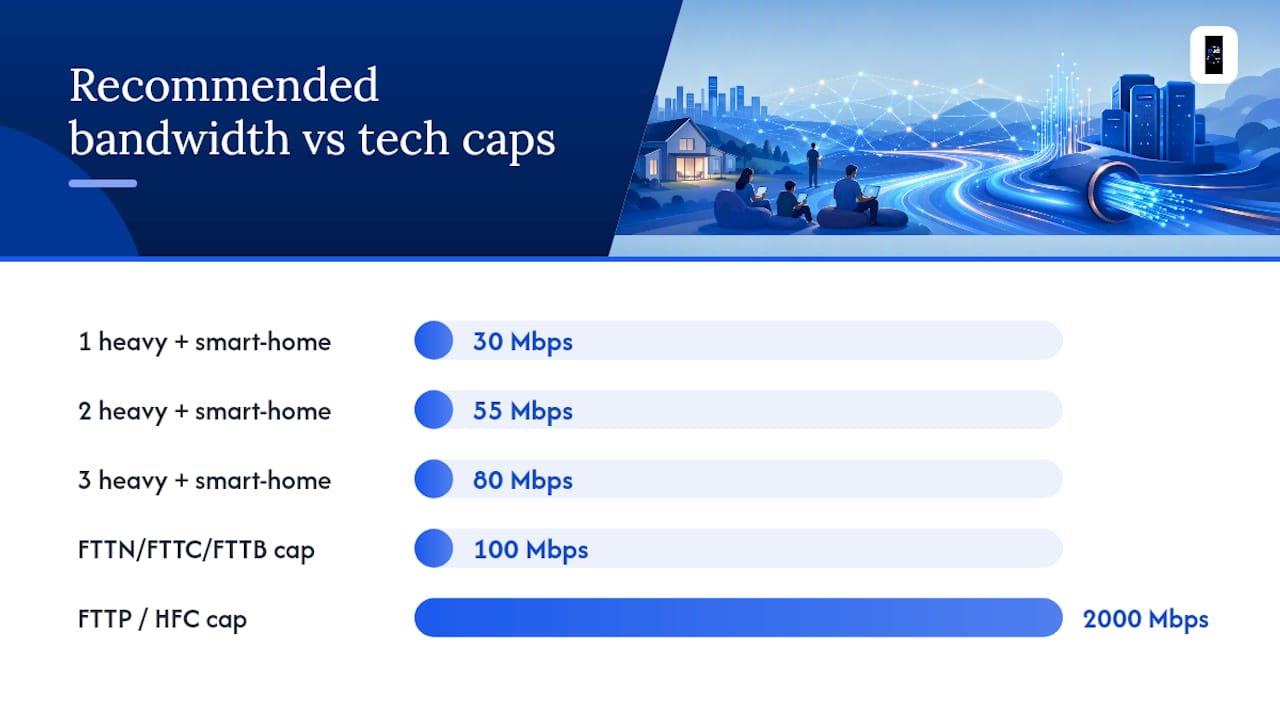
Table of Contents
- What are the official NBN speed tiers?
- Which connection types can access which tiers?
- Why Typical Evening Speed matters more than the tier label
- How to pick the right NBN tier for your household
- How providers price NBN tiers and what to watch for
- When the fastest NBN tiers are actually worth it
- When your home network is the real bottleneck
- A local engineer's perspective on NBN tier selection
- Professional NBN installation and Wi-Fi design in South East Queensland
- Sources
What are the official NBN speed tiers?
NBN Co publishes wholesale speed plans under retail-facing tier names that map to specific maximum download and upload speeds. Retailers then sell plans built on those wholesale tiers, often under their own marketing labels, which is why the same underlying product can appear as "Superfast," "Ultra," or "Turbo" depending on the provider.
A few things worth noting about how these tiers are structured:
- Asymmetry is the norm. Every tier delivers far more download capacity than upload. NBN 50 gives you 50 Mbps down but only 20 Mbps up.
- Upload variants exist at NBN 100. The NBN 100/20 and NBN 100/40 plans share the same download ceiling but differ on upload. If you work from home or upload large files regularly, the 40 Mbps upload variant is worth the small price premium.
- Tiers above 100 Mbps are not universally available. NBN 500, 750, 1000, and 2000 require specific connection technology at your address.
- NBN 12 and NBN 25 are rarely the right choice for households with more than one or two light users. At current pricing, the gap between NBN 25 and NBN 50 is often small enough that NBN 50 is the better default.
Which connection types can access which tiers?
Your physical connection technology sets a hard ceiling on which tiers you can order. Canstar documents that FTTP and HFC commonly enable the fastest tiers, while twisted-pair technologies often top out lower.
- FTTP (Fibre to the Premises): Access to all tiers, including NBN 500, 750, 1000, and 2000. Following NBN Co's 2025 accelerations, FTTP addresses are the primary beneficiaries of the multi-gigabit tiers.
- HFC (Hybrid Fibre Coaxial): Generally supports up to NBN 1000 on most HFC nodes, though NBN 2000 availability varies by area and retailer.
- FTTN (Fibre to the Node): Typically tops out at NBN 100, and real-world speeds depend heavily on the copper distance from the node to your premises. Some FTTN addresses cannot reliably sustain even NBN 50.
- FTTC (Fibre to the Curb): Similar ceiling to FTTN in practice, though the shorter copper run usually delivers more consistent NBN 100 performance.
- FTTB (Fibre to the Building): Common in apartment blocks; typically supports up to NBN 100, with performance varying by the building's internal wiring.
- Fixed Wireless: Usually capped at NBN 50 or NBN 75 depending on the tower and your distance from it. NBN Co has been upgrading fixed wireless towers, but gigabit tiers are not available on this technology.
- Sky Muster Satellite: Designed for remote addresses with no other NBN option. Speeds are limited and latency is high; not suitable for real-time gaming or video calls at scale.
Pro Tip: Don't assume your connection type from a neighbor's experience. Two houses on the same street can have different technologies. Check your exact address at your retailer's serviceability tool or via the NBN Co address checker before comparing plans.
For rural properties in South East Queensland where NBN technology is limited or unavailable, Starlink is a strong alternative worth comparing against fixed wireless or satellite NBN options.
Why Typical Evening Speed matters more than the tier label
The advertised tier maximum is the theoretical ceiling under ideal conditions with zero network congestion. The Typical Evening Speed is what you actually get during the 7 PM to 11 PM busy window, when most households are online simultaneously.
Selectra explains that TES is the most useful figure for comparing real-world plan performance because it reflects retailer bandwidth provisioning decisions, not just the wholesale tier. Retailers buy shared bandwidth (called CVC) from NBN Co, and a retailer that purchases more CVC per customer will consistently deliver higher TES. Two plans on identical NBN 100 tiers from different retailers can produce evening speeds that differ by 30 Mbps or more.
TES ranges above are illustrative of the spread seen across retailers; actual figures vary by provider and location.
The ACCC's Measuring Broadband Australia program provides independent, retailer-by-retailer testing data that cuts through marketing claims. Before committing to a plan, check whether your shortlisted retailer's TES on that tier holds up in ACCC testing.
Pro Tip: When comparing two plans on the same tier, the retailer with the higher published TES and a strong ACCC result is almost always the better pick, even if their monthly price is a few dollars more.
A retailer's TES is the single number that tells you how seriously they invest in their network. Everything else is marketing.
How to pick the right NBN tier for your household
Size your connection by concurrent heavy demand, not by the number of people in the house. Someone who only checks email barely registers on the bandwidth budget. The users who matter are those simultaneously streaming 4K, gaming online, or on video calls.
Reviews sizing by concurrent heavy users and rounding up to the next tier. A practical rule: allow roughly 25 Mbps per heavy user, then add 1–5 Mbps for smart-home devices, security cameras, and background app updates.
| Household Type | Recommended Tier | Reason |
|---|---|---|
| Solo light user (email, browsing, SD/HD video) | NBN 25 | Single stream, no concurrent demand |
| Couple, moderate use | NBN 50 | Two concurrent HD/4K streams with headroom |
| Family of 4, mixed use | NBN 50 or NBN 100 | Depends on simultaneous 4K and gaming |
| Heavy WFH household | NBN 100/40 | Upload variant matters for video calls and file transfers |
| Sharehouse (4–6 people) | NBN 100 | Multiple concurrent heavy users |
| Power user / content creator | NBN 500+ | Large uploads, multi-device 4K, cloud backup |
A quick sizing check:
- Count your concurrent heavy users (4K streaming, gaming, video calls, large uploads).
- Multiply by 25 Mbps.
- Add 5 Mbps for smart-home overhead.
- Round up to the next tier.
A family with two 4K streams and one video call running at the same time needs roughly 65–75 Mbps, which puts NBN 100 as the safe choice over NBN 50.
The upload question. Most households on NBN 100 are fine with the 20 Mbps upload variant. If one or more people regularly upload large video files, run video calls in 1080p, or access remote desktops, the NBN 100/40 variant is worth the small premium. The difference between 20 Mbps and 40 Mbps upload is invisible for casual use and significant for anyone pushing data outbound.
Pro Tip: If you're on the fence between NBN 50 and NBN 100, check whether your retailer offers NBN 100 at a similar promotional price. WhistleOut analysis shows the two tiers sometimes appear at nearly identical intro prices, making NBN 100 the obvious pick during the discount window.
How providers price NBN tiers and what to watch for
Retailer pricing for NBN plans follows a pattern that catches a lot of buyers off guard. The headline price in the ad is almost always an introductory rate, typically valid for the first 6 months, after which the plan reverts to a higher ongoing price.
WhistleOut's price analysis shows that NBN 100 and NBN 50 can appear at similar promotional prices while diverging by $10 or more per month once the discount period ends. Always ask for the ongoing price before signing.
Key questions to ask any retailer before committing:
- What is the ongoing monthly price after the intro period?
- What TES do you publish for this tier at my address?
- Is the NBN 100 plan the 20 Mbps or 40 Mbps upload variant?
- Is a modem/router included, or do I need to supply my own?
- Are there exit fees or lock-in contracts?
- Is my address confirmed serviceable for this tier?
Following NBN Co's 2025 tier accelerations, some retailers now offer NBN 500 to eligible FTTP and HFC addresses at prices that were previously associated with NBN 100. If your address is FTTP or HFC, it is worth asking whether NBN 500 is available and at what ongoing price, because the value calculation has shifted considerably since those upgrades rolled out.
Plan naming is another trap. Retailers use marketing labels like "Superfast," "Turbo," and "Ultra" that do not map consistently to NBN Co's wholesale tier names. Always confirm the underlying tier (NBN 50, NBN 100, etc.) and the TES figure, not just the plan's brand name.
When the fastest NBN tiers are actually worth it
NBN 500, 750, 1000, and 2000 are genuinely useful for a narrow set of use cases. For most homes, NBN 100 already delivers more than enough capacity during peak hours, and paying for 500 Mbps or more produces no noticeable difference in everyday use.
The scenarios where the faster tiers earn their cost:
- Multiple simultaneous 4K streams across many devices. Four or five 4K streams running concurrently will push past NBN 100's practical ceiling at busy times.
- Large concurrent cloud backups. Uploading terabytes to cloud storage while others are streaming requires headroom that NBN 100/20 cannot comfortably provide.
- Content creators with heavy upload workloads. Video editors pushing 4K footage to cloud storage or remote editing platforms benefit from NBN 500's 50 Mbps upload or NBN 2000's 200 Mbps upload.
- Small offices with multiple simultaneous users. A business with 8–12 staff all on video calls and cloud applications simultaneously will outgrow NBN 100 quickly.
- Future-proofing an FTTP premises. If your address has FTTP and the price gap between NBN 100 and NBN 500 is small, NBN 500 gives you room to grow without switching plans.
NBN Co's 2025 announcements confirmed the rollout of multi-gigabit tiers, including NBN 2000, for eligible FTTP and HFC premises. These tiers are currently available through a limited number of retailers and are primarily relevant for power users and small businesses, not typical households.
One practical note: your home network needs to be capable of handling gigabit speeds before the NBN tier matters. A single-band router from 2018 will not deliver 500 Mbps to your devices regardless of what the NBN line can carry.
When your home network is the real bottleneck
A common frustration: you upgrade to NBN 100, run a speed test on your phone, and see 35 Mbps. The NBN line is fine. The problem is inside the house.
Start with these checks before calling your provider:
- Restart your modem and router. Not just the router, the modem too. Leave them off for 30 seconds.
- Test wired vs. Wi-Fi. Plug a laptop directly into the modem with an Ethernet cable and run a speed test. If the wired result matches your TES, the NBN line is delivering what it should and the issue is your Wi-Fi.
- Test at different times. A slow result at 8 PM might be congestion at the retailer level. A slow result at 10 AM is more likely a local issue.
- Check your modem/router age. ISP-supplied modems are often entry-level hardware. A router that only supports 2.4 GHz Wi-Fi or Wi-Fi 4 (802.11n) will cap your wireless speeds well below what NBN 100 can deliver.
- Check router placement. A router inside a cabinet, behind a TV, or at one end of a long house will produce dead zones and slow speeds in distant rooms.
Common local bottlenecks and quick fixes:
- Single-band or old router: Replace with a Wi-Fi 6 (802.11ax) router or a mesh system for larger homes.
- Overloaded 2.4 GHz channel: Switch devices to 5 GHz where possible; 2.4 GHz is shared with neighbors and degrades in dense areas.
- Old internal cabling: In older homes, the phone line running to the modem may be degraded. A direct cable from the NBN connection point to the router eliminates this variable.
- Too many devices on one access point: A mesh system distributes load across multiple nodes and eliminates the single-point bottleneck.
When to hire a professional: if wired speed tests consistently fall below your published TES, that is a provider or line issue, not a home network issue. Contact your retailer and request a line check. If wired tests match TES but Wi-Fi coverage is patchy or slow in parts of the house, a professional Wi-Fi site survey will identify dead zones, interference sources, and the optimal placement for access points or mesh nodes. For persistent coverage gaps in larger homes or businesses, structured cabling and a managed switch give you a backbone that Wi-Fi alone cannot replicate.
Pro Tip: If your evening wired speed already matches your TES, the issue is Wi-Fi, not the NBN. If wired is consistently below TES, contact your provider first, then check whether your connection type supports the tier you ordered.
A local engineer's perspective on NBN tier selection
The gap between what people expect from an NBN upgrade and what they actually experience is almost always a home-network problem, not a tier problem. Most households that call frustrated after moving from NBN 50 to NBN 100 are running the same router they had three years ago, placed in the same corner of the house.
The tier decision matters, but it is the last decision, not the first. Start with a serviceability check to confirm what your address can actually access. Then compare TES figures between retailers on your shortlisted tier, cross-referenced against ACCC Measuring Broadband Australia data. Only then does the tier label become meaningful.
Upload speed is the most underestimated variable. The shift to hybrid work has made the NBN 100/40 variant genuinely important for households with one or more people working from home. A 20 Mbps upload ceiling sounds fine until two people are on simultaneous video calls and someone is pushing a large file to a cloud drive.
The 2025 NBN Co tier accelerations changed the value equation for FTTP and HFC addresses in a real way. NBN 500 is now within reach at prices that used to buy NBN 100. If your address has FTTP, it is worth asking your retailer whether NBN 500 is available before defaulting to NBN 100 out of habit.
At Djcengineering, the most common finding on a site visit is that the NBN line is performing exactly as contracted, and the bottleneck is a single-band router in the wrong room. Fixing the home network costs less than upgrading the tier and delivers a more noticeable improvement.
Professional NBN installation and Wi-Fi design in South East Queensland
Getting the NBN tier right is step one. Getting the performance out of it inside your home or business is step two, and that is where most people leave speed on the table.

Djcengineering provides accredited NBN and Starlink provisioning, professional site surveys, structured cabling, and mesh Wi-Fi design across South East Queensland. Whether you need a full structured cabling installation to support a home office or a business-grade mesh Wi-Fi system that actually covers every corner of the building, Djcengineering delivers measurable results. Get in touch at Djcengineering to book a site assessment and find out exactly what your address can access and what your home network needs to make the most of it.
Sources
- nbn Network Speeds / nbnco
- NBN Plans 2026: Tiers, Real Speeds & How to Pick One | Selectra
- Measuring Broadband Australia | ACCC
- NBN 50 vs. NBN 100: Price and value compared | WhistleOut
- Reviews
- NBN Speeds Explained | Canstar
Recommended
- Commercial WiFi Systems: Engineering High-Performance Networks for QLD Businesses | DJC Engineering
- Starlink: High-Speed Internet Guide for Rural QLD | DJC Engineering
- Professional WiFi Design vs Mesh: Why Your Gold Coast Home Still Has Black Spots | DJC Engineering
- Commercial WiFi Design Brisbane: The Master Technician’s Guide to Business Connectivity | DJC Engineering