
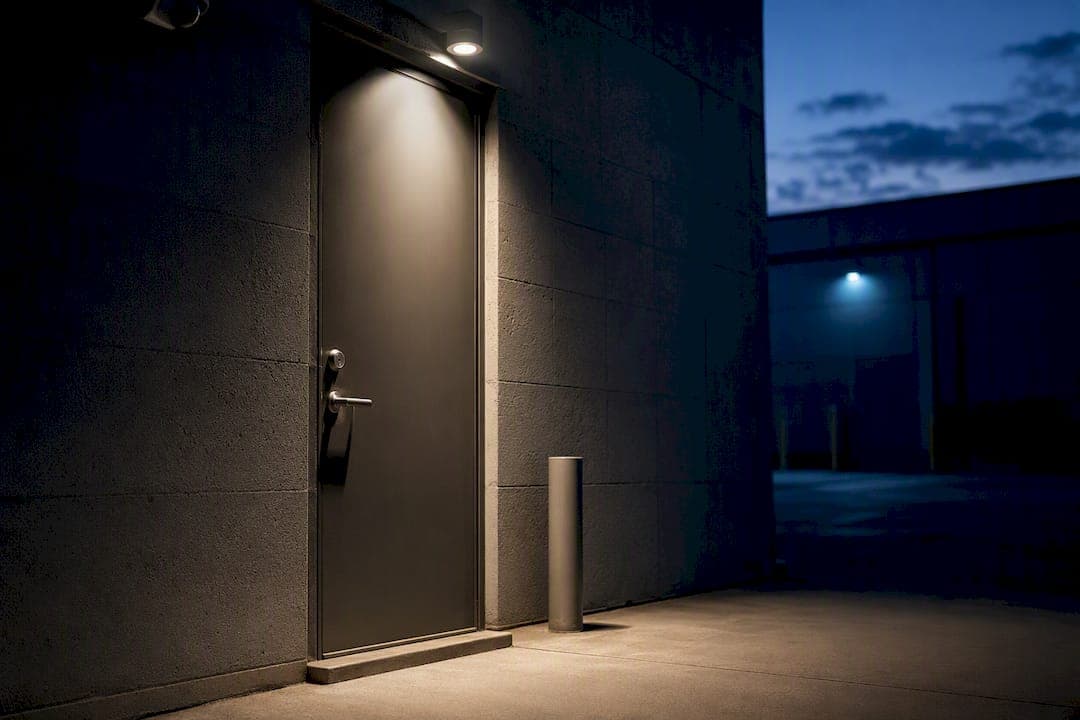
Before any installer sets foot in your building, get five things locked into the quote: a written site survey with a cable schedule, an itemized price broken out by system (CCTV, access control, alarm, cabling), a PoE power budget, a UPS plan, and a commitment to hand over commissioning documents and as-built drawings at completion. Everything else on a small business security checklist flows from those five items.
TL;DR:
- A detailed site survey must document cable lengths, power point locations, building features, and dependencies to ensure accurate installation and quoting.
- Verify that Ethernet runs do not exceed 100 meters without midspan extenders and choose cable types like Cat6A for future scalability and higher bandwidth needs.
- The PoE switch's total power budget should support all connected devices at full load, and UPS sizing must account for critical equipment during outages.
- Camera placement should prioritize entry points, face visibility, high resolution for identification, and storage retention periods of 30 to 90 days, with secure, VLAN-separated networks.
- Establish a clear incident response plan, conduct post-installation audits, and ensure proper documentation, backups, and staff training to maintain system effectiveness and readiness.
- ✓4K CCTV systems with AI capabilities
- ✓Secure CCTV options
- ✓Structured cabling
- ✓Networking and internet solutions
Table of Contents
- What Should a Site Survey Actually Document?
- Structured Cabling and PoE: Rules You Must Verify in the Quote
- What Makes CCTV Placement and Storage Work Well?
- Access Control and Alarm Essentials to Include in Scope
- What Should a Wi-Fi and Internet Site Survey Deliver?
- How to Compare Quotes and Choose an Installer
- Commissioning, Testing, and Handover: What to Require Before You Pay the Final Invoice
- Physical Security Measures Beyond Cameras and Access Control
- Cybersecurity Basics That Protect Your Physical Security Systems
- Why Employee Training Matters as Much as the Hardware
- Data Backup and Disaster Recovery for Your Security Systems
- Incident Response: What Happens When the Alarm Actually Goes Off
- Why Ongoing Audits Keep the System Actually Working
- Installer Perspective: Priorities That Save Time and Money
- How DJC Engineering Delivers This Checklist End to End
- Sources
- FAQ
What Should a Site Survey Actually Document?
A site survey isn't just a walkthrough with a clipboard and a guess. It's the document that keeps your quote honest and your install free of surprises. A professional site survey should capture cable lengths, power points, and building fabric details, then translate all of it into a cable schedule the installer actually works from.
Here's what a proper survey covers before a single cable gets pulled:
- Every camera, reader, and sensor location walked and measured in person, not estimated from a floor plan.
- Actual cable run lengths recorded, factoring in ceiling voids, wall penetrations, and conduit routes. Expect real-world runs to land 30 to 50% longer than a straight-line floor-plan estimate.
- Power point locations, head-end room or cabinet position, mounting surfaces, and anything that affects installation (metal cladding, brick, high ceilings, weatherproofing needs outdoors).
- A cable schedule listing each device, run length, cable type, and termination point, paired with a placement diagram.
- Cross-trade dependencies and exclusions spelled out in writing. Door hardware changes, fire-stopping through rated walls, and electrical works often sit outside the security scope unless you ask.
- A procurement and lead-time list, since specialty readers or long-lead cameras can delay a project by weeks if nobody flags them early.
Once that's done, insist on an itemized quote by system. A single lump-sum number hides where your money actually goes and makes it impossible to compare against a competing bid.
Structured Cabling and PoE: Rules You Must Verify in the Quote
Ethernet has a hard physical limit. Cable runs on Cat5e or Cat6 cannot exceed 100 meters (328 feet) without a midspan extender, and that number includes patch cords at both ends, not just the wall-to-wall run. If your head-end room sits far from a loading dock camera or a back-lot gate, your installer needs to plan for an extender or a local network point from day one, not discover the problem mid-install.
Cable choice matters more than most owners realize:
- Cat6A costs more upfront but avoids a re-pull later if you add access points, multi-sensor cameras, or higher-bandwidth devices down the line. Pulling Cat6A instead of re-pulling cable later almost always wins on lifecycle cost.
- Cat6 can be perfectly adequate when your device list is fixed and unlikely to grow.
- PoE comes in three flavors: 802.3af (about 15W), 802.3at or PoE+ (up to 30W), and 802.3bt or PoE++ (up to 60W or more). The port rating on paper matters less than the switch's total power budget across all ports combined.
Pro Tip: Ensure that the total PoE power budget of the switch can support all connected devices at full load. Ask for the total wattage budget in writing, plus headroom for growth.
A 16-port managed PoE+ switch running 30W per port on a dedicated VLAN is usually enough for four to eight cameras with room to spare for analytics. Size your UPS to carry the NVR, switch, and any access control power supply through the outage window you actually care about, and add surge protection ahead of it.
What Makes CCTV Placement and Storage Work Well?
Camera count matters less than camera location. Get these right and everything downstream, from image quality to storage costs, falls into place.
- Prioritize camera coverage at entrances, cash handling areas, stockrooms, and loading zones. Skip bathrooms and changing rooms entirely; those are privacy exposures, not security gains.
- Mount cameras around head height, angled to capture faces at entry points rather than the tops of heads.
- Overlap adjacent camera fields slightly to avoid blind gaps.
- Use high resolution wherever identification matters (tills, entrances), and lean on H.265 encoding to keep storage costs manageable at that resolution.
- Decide retention before you size storage. Most small commercial sites need 30 to 90 days of footage retention, and that number drives how much disk you actually need.
- Choose between an on-site NVR, cloud recording, or NAS based on bandwidth and budget, but keep the recorder and PoE switch on the same UPS so a power blip doesn't take out recording while cameras stay live.
- For remote viewing, use a VPN or a vendor's secure P2P service rather than forwarding camera ports directly to the internet. Open ports are one of the easiest ways a camera system gets compromised.
For a deeper look at mounting angles and coverage math, DJC Engineering's guide on CCTV camera placement walks through the trade-offs in more detail.
Access Control and Alarm Essentials to Include in Scope
Access control and intruder alarms get bundled into CCTV quotes more often than they should, and that's where scope gaps hide. Confirm the quote lists every component by name: controller, readers, electric strikes or maglocks, power supplies, and any door hardware that needs replacing to accept the new lock.
For the alarm side, you want a defined zone layout, panic button locations, a monitored connection to an alarm receiving center, and cellular backup in case the phone line or internet drops during a break-in attempt.
- Check for cross-trade dependencies up front: carpentry for door frame modifications, or an interface with an existing fire panel.
- Anything not directly quoted should appear as a listed exclusion, not a silent assumption.
- Ask for the installer's license number, proof of insurance, and confirmation of the monitoring center connection or local monitoring arrangement before signing anything.
What Should a Wi-Fi and Internet Site Survey Deliver?
A Wi-Fi survey should produce a heatmap, not a hunch. That heatmap shows exactly where access points go and which channels avoid interference from neighboring networks or thick masonry walls.
- Decide between mesh access points and a controller-based system based on how many devices and cameras need to ride the network simultaneously; a busy retail floor with VMS traffic needs more capacity planning than a two-room office.
- Backhaul options matter more than owners expect. A dedicated NBN connection suits most urban and suburban sites, while Starlink increasingly serves rural or high-site locations where fixed-line options fall short. Cellular failover keeps alarm monitoring alive if the primary connection drops.
- Require throughput and latency targets in writing, and ask for camera traffic to sit on its own VLAN so a saturated guest Wi-Fi network never chokes your recording feed.
How to Compare Quotes and Choose an Installer
Two quotes that look similar on price can hide very different scopes. Comparing them properly takes ten minutes and saves you from a bad surprise three months in.
- Line up quotes on identical terms: same retention days, same cable category, same PoE power budget, same UPS runtime. A cheaper quote using Cat6 instead of Cat6A, or 30 days of retention instead of 60, isn't actually cheaper.
- Look for an itemized equipment list naming actual models, not vague line items like "camera package."
- Confirm the installer's site-survey notes exist as a real document, not a verbal summary from a walkthrough.
- Verify licenses, insurance, and what warranty or maintenance plan comes with the install.
- Ask for references or, better, a sample commissioning certificate from a past job so you know what handover documentation actually looks like.
- Walk away from anyone quoting a full system with no site visit, no mention of UPS or power planning, or a single lump-sum number with no breakdown by system.
Commissioning, Testing, and Handover: What to Require Before You Pay the Final Invoice
Commissioning is where a good install gets proven, not just assumed. Commission each system separately: confirm every camera's live image and recorded playback, trigger a motion event on each one, and check remote access actually works from outside the building.
For access control, test every reader and every door individually, confirm fail-safe versus fail-secure behavior matches the fire code requirement for that door, and pull the access log to make sure events are actually recording. For the alarm, walk every zone, trip it, and confirm the signal reaches the monitoring center with a documented test reference.
- The handover pack should include as-built drawings, an equipment schedule with serial numbers, a signed commissioning certificate, a data retention and privacy policy for the CCTV footage, a maintenance schedule, and secure handover of every credential and admin password.
- Following a fixed sequence, cabling first, then head-end commissioning, then device-by-device testing, is what prevents an installer from having to come back three times.
Pro Tip: Book a 30-day review after handover. Most nuisance alerts, weak Wi-Fi corners, and misjudged camera angles show up in the first month, and a scheduled check catches them before they become a pattern you just live with.
Physical Security Measures Beyond Cameras and Access Control
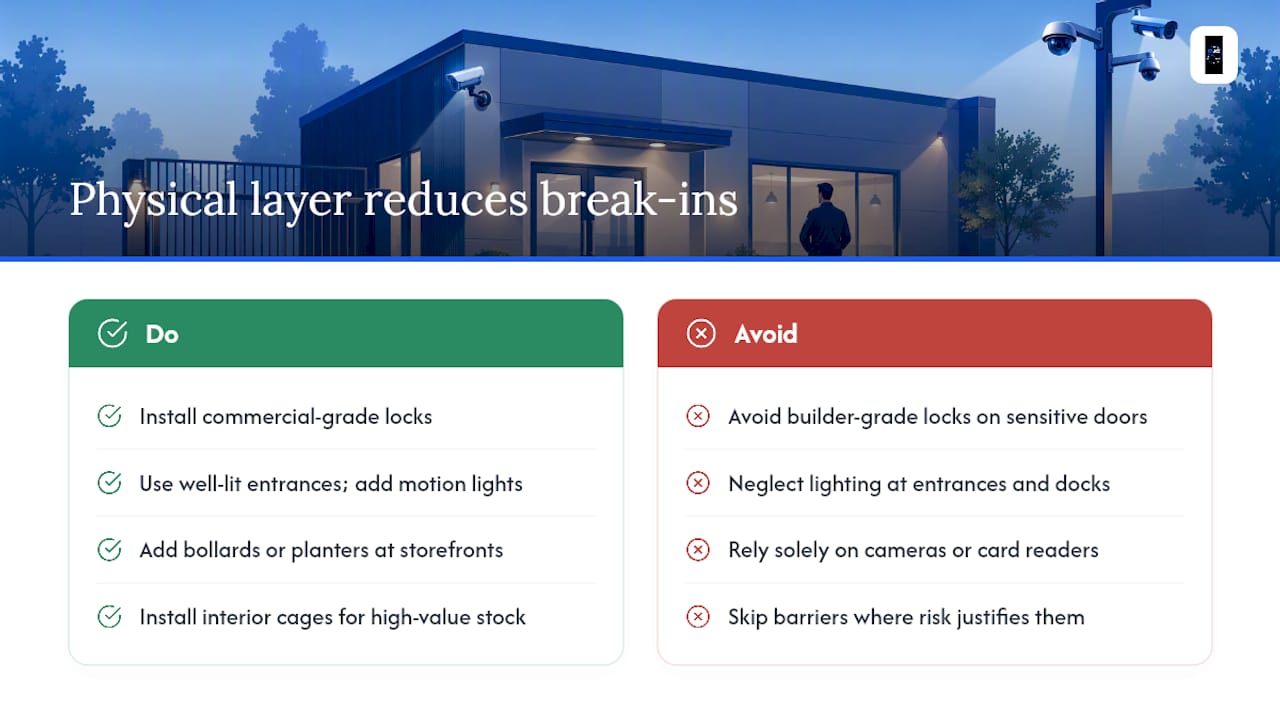
Cameras and card readers get the attention, but they're only part of a small business security plan. The physical layer around them, locks, lighting, and barriers, often determines whether a break-in attempt even gets as far as your cameras.
Start with the locks themselves. Standard pin tumbler locks on a back door are trivial to defeat compared to a commercial-grade deadbolt or a mortise lock rated for business use. If a door leads to a stockroom, server closet, or cash office, it deserves better hardware than the front reception door, not the same builder-grade lock that came with the building.
Lighting does more security work than most owners credit. Well-lit entrances, loading docks, and parking areas discourage loitering and give your cameras usable footage after dark instead of grainy, underexposed clips. Motion-activated lighting on rear entrances and side alleys is inexpensive and pairs naturally with a camera system already covering those zones.
Barriers matter for specific risk profiles. Bollards or planters in front of a storefront window prevent ram-raid style break-ins. Interior cage barriers around high-value stock protect against an intruder who's already inside. Even something as simple as a drop bar on a rear fire exit, installed to code, closes a gap that a standard lock alone won't.
None of this replaces CCTV or access control. It backs them up, so that if a camera fails to catch a clear angle or a reader gets bypassed, there's still a physical layer standing between an intruder and your assets.
Cybersecurity Basics That Protect Your Physical Security Systems
Your CCTV recorder, access control panel, and Wi-Fi network are computers on your business network, and that means they're exposed to the same risks as any other device if nobody locks them down.
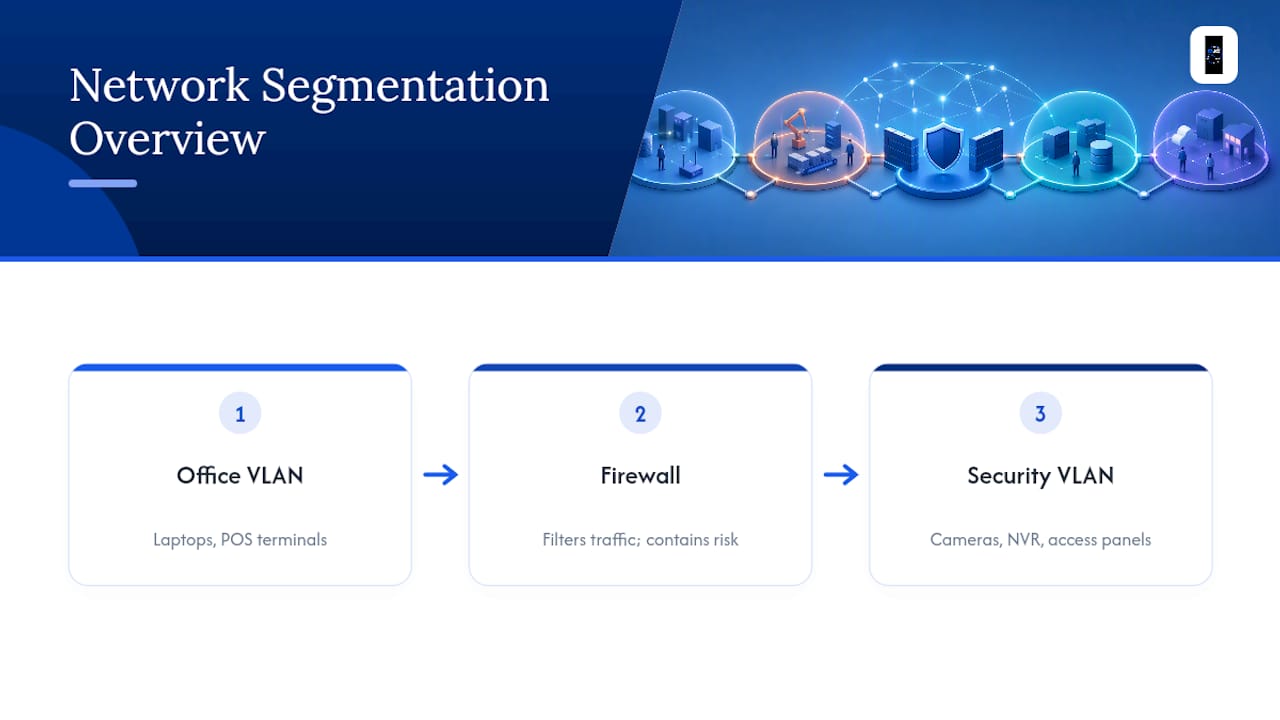
A firewall separating your security equipment from your general office network is a baseline step, not an advanced one. Cameras, NVRs, and access control panels should sit on their own VLAN, isolated from the laptops and point-of-sale terminals that staff use daily. That segmentation limits the damage if either side gets compromised.
Password policy matters just as much for a camera system as it does for email. Every NVR, camera, and access control panel ships with a default admin password, and leaving it unchanged is one of the most common ways small business security systems get breached. Change every default credential during commissioning, use unique passwords per device where the system allows it, and store them somewhere more secure than a sticky note on the server rack.
Basic antivirus and regular software updates apply to the PCs running your video management software just as much as they apply to any office computer. An outdated VMS client running on an unpatched Windows machine is a soft target, even when the cameras themselves are current.
None of this requires an IT department. It requires an installer who treats your security network as seriously as your office network, and asks about firewall rules, VLAN segmentation, and password resets as part of the standard commissioning process rather than as an afterthought.
Why Employee Training Matters as Much as the Hardware
The best CCTV system in the world doesn't stop an employee from propping a fire exit open for a smoke break, and no access control panel prevents someone from holding the door for a stranger who "forgot their badge."
Training doesn't need to be elaborate. A short onboarding briefing covering how the access system works, what to do if a badge is lost, and why propping open a monitored door defeats the entire point of having one, closes most of the gap. Staff should know who to call if a camera looks broken or an alarm keypad starts beeping intermittently, rather than assuming someone else will notice.
Tailgating, letting an unbadged person follow you through a secured door, is one of the most common ways access control gets bypassed, and it's almost always well-intentioned. A quick reminder during training that "holding the door" for a stranger isn't politeness, it's a security gap, changes behavior more than any sign on the wall.
For businesses with regular visitors, contractors, or deliveries, a formal visitor sign-in process matters more than an expensive reader upgrade. A tool like EntryWatch's visitor management system gives front-desk staff a simple way to log who's on site and when, which closes a gap that cameras alone can't cover: knowing exactly who was in the building at a given hour.
Data Backup and Disaster Recovery for Your Security Systems
Recorded footage only has value if it's actually retrievable when you need it, whether that's for an insurance claim, a police request, or an internal HR matter.
A single point of failure kills more footage archives than anyone expects. If your NVR sits in a back room with no backup and that room floods or the drive fails, months of retention disappear in an instant. A basic disaster recovery plan for a small business security system means recording to at least two locations: a local NVR or NAS for day-to-day access, and a secondary copy, whether cloud-based or an offsite backup drive rotated weekly.
Access control logs and configuration settings deserve the same treatment. If a controller fails and nobody has a backup of the door schedules, badge assignments, and access levels, rebuilding that from memory can take days and introduces errors. Ask your installer whether the access control platform supports exporting a configuration backup, and how often that export should happen.
Power interruptions are the most common disaster a small business actually faces, far more often than fire or flood. The UPS sized during your cabling and PoE planning covers the recorder and switch for a short outage, but for anything longer, confirm whether the system has a documented restart procedure so cameras and access control come back online automatically rather than requiring someone to drive in and reboot equipment manually.
Incident Response: What Happens When the Alarm Actually Goes Off
A security system is only as useful as the plan for what happens the moment it detects something. Too many small businesses install cameras and alarms without ever writing down who does what when an alert fires at 2 a.m.
Start with a simple chain of contact: who gets the first alarm notification, who has authority to call police, and who has the physical keys or remote access to check camera footage without driving to the site. If your alarm connects to a monitored receiving center, confirm the call list is current, because an outdated contact list is one of the most common reasons a monitored alarm still results in a slow response.
Build a short written procedure for the most likely scenarios: an after-hours alarm trigger, a suspicious person caught on camera during business hours, and a lost or stolen access badge. Each scenario needs a clear first action, not a debate in the moment about who's supposed to handle it.
Review footage retention rules against how your incident response plan actually uses that footage. If an incident isn't reviewed and flagged for retention within your 30 to 90 day window, it can overwrite before anyone realizes it mattered. A simple habit, checking footage after any reported incident within 48 hours, prevents that loss.
Why Ongoing Audits Keep the System Actually Working
An installed security system degrades quietly if nobody checks on it. Cameras get bumped out of position by cleaning staff, access badges get issued to employees who left months ago, and firmware updates pile up unapplied.
A quarterly audit doesn't need to be a formal event. Walk the site and confirm every camera still points where it should, test a sample of doors to confirm access levels match current staff, and check that the NVR still has adequate free storage for the retention window you set. Annually, that audit should extend to firmware updates on cameras, NVRs, and access panels, since unpatched devices are a known entry point for network intrusions.
Maintenance schedules matter just as much as the initial install. Ask your installer whether they offer a maintenance agreement that includes firmware updates, battery replacement in the UPS, and a periodic check of alarm zone sensitivity. A UPS battery that's quietly failed protects nothing during the next power outage, and nobody finds out until it's too late.
Installer Perspective: Priorities That Save Time and Money
Get the site survey and power planning right, and commissioning follows easily. Monitoring and documentation deliver more real value than chasing the highest-spec camera on the shelf.
— Dylan
How DJC Engineering Delivers This Checklist End to End
Running this checklist against three different contractors, one for cabling, one for cameras, one for Wi-Fi, means three site visits, three sets of documentation, and three companies to call if something doesn't talk to the other.

That single-provider approach is exactly what this checklist is built to demand: one site survey, one itemized quote broken out by system, one commissioning certificate covering everything from cabling to cameras to network backhaul. No coordination gaps between contractors, no argument about whose scope a dropped camera feed falls under. If you're planning a new install or replacing an aging system, book a site survey with Djcengineering and request an itemized quote through the structured cabling and networking page to see exactly how the numbers break down for your site.
Sources
The technical thresholds referenced throughout this checklist come from named industry sources rather than general guidance:
- Security cables — CtrlOps
- How to quote and run a commercial security systems installation — Zigaflow
FAQ
What Should Be on a Small Business Security Checklist Before Hiring an Installer?
Require a written site survey with a cable schedule, an itemized quote by system, a PoE power budget with UPS sizing, and a commissioning certificate with as-built drawings at handover.
How Long Should a Small Business Keep CCTV Footage?
Most small commercial sites need 30 to 90 days of retention, and that figure should be decided before storage is sized, not after.
Should I Choose Cat6 or Cat6A Cable for a Security Install?
Cat6A costs more upfront but avoids re-pulling cable later if you add access points or higher-resolution cameras; Cat6 is fine for a fixed, known device list.
What's the Maximum Ethernet Cable Run for a Security Camera?
Cat5e or Cat6 runs cannot exceed 100 meters (328 feet) without a midspan extender, so head-end placement needs to account for that limit early.
Can One Contractor Handle CCTV, Cabling, and Wi-Fi Together?
Yes. Some contractors design and commission CCTV, structured cabling, mesh Wi-Fi, and internet connectivity as a single scoped project, avoiding the coordination gaps of hiring separate contractors.
Recommended
- Commercial Alarm Systems: A Technical Guide for Gold Coast Businesses in 2026
- Commercial Security System Installation Gold Coast: The 2026 Buying Guide
- Commercial CCTV Security: A Professional Guide to High-Performance Surveillance
- Integrated Security System Installation Gold Coast: The 2026 Engineered Selection Guide