
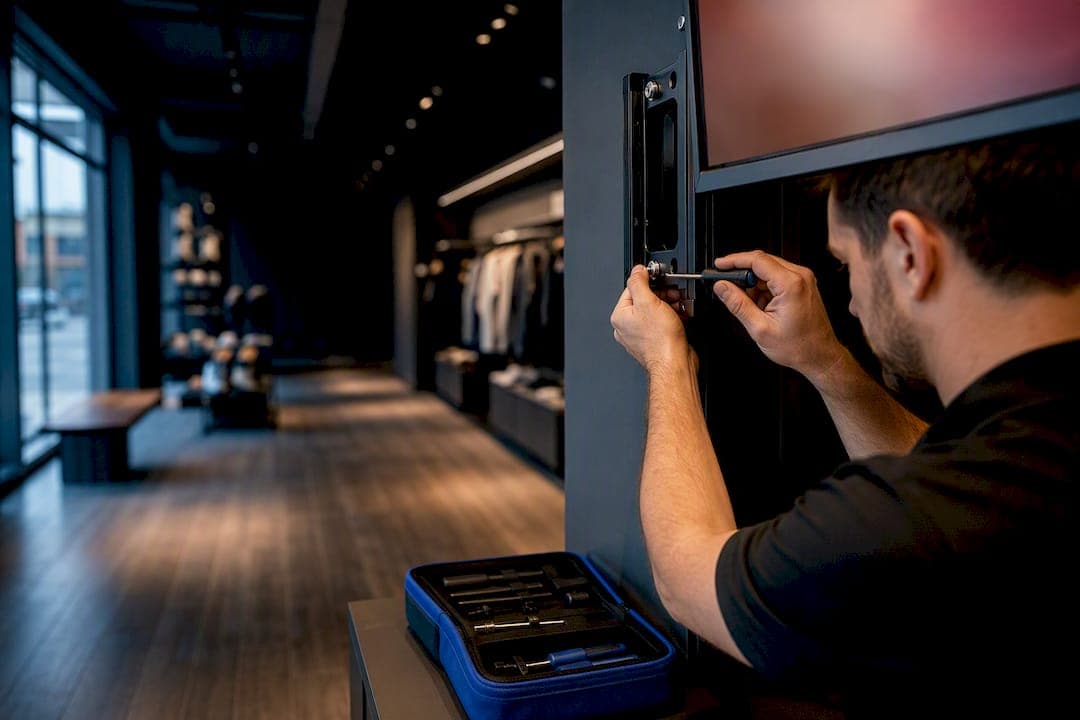
Digital signage for retail lifts engagement and conversion, but only when the screens are commercial-grade and the content is managed through a real CMS instead of a looping USB drive. Retailers see the strongest results by matching display type to store zone, from window screens to checkout prompts. For always-on installs, window-facing units, video walls, or multi-store rollouts, hire a professional installer rather than mounting a consumer TV and hoping the network holds up.
TL;DR:
- Commercial displays are essential for retail signage due to their higher brightness, durability, and longer duty cycles, unlike consumer TVs that wear out quickly and wash out in sunlight.
- Proper placement of screens according to store zones and purpose significantly impacts engagement, with specific visual and interaction needs for windows, checkout, and operational areas.
- A reliable digital signage system requires a cloud-based CMS, dedicated media players or SoC displays, and robust connectivity, with wired Ethernet preferred for maximum reliability.
- Professional installation and full site surveys are crucial to prevent failures caused by poor ventilation, cabling issues, or network dead zones, which are the most common causes of signage downtime.
- Measuring campaign impact through proof-of-play data, POS correlation, and impressions is vital to justify investment and optimize signage performance over time.
Table of Contents
- Types of Digital Signage for Retail and Where to Place Them
- How a Retail Digital Signage System Actually Works
- Commercial Displays vs Consumer TVs: Why the Difference Matters
- What Content Actually Works on Retail Screens?
- What Installation and Connectivity Does Digital Signage Need?
- What Does Digital Signage Cost, and How Do You Measure ROI?
- How Do You Buy and Install Digital Signage the Right Way?
- Notes From the Field: What Actually Breaks Retail Signage Installs
- Get Retail Signage Installed Right the First Time
- Sources
- FAQ
Types of Digital Signage for Retail and Where to Place Them
Store layout should drive the hardware decision, not the other way around. A screen that works at the entrance will fail in a window, and a menu board layout looks wrong on an aisle end-cap.
- Window and storefront displays need high brightness and anti-glare glass to compete with sunlight and pull foot traffic off the sidewalk.
- Entry and hero screens carry campaign messaging and seasonal offers, the first thing a shopper sees after the door.
- Aisle, end-cap, and shelf-edge displays call out specific products, pricing, and promotions right where the buying decision happens.
- Checkout and queue screens handle impulse prompts, loyalty sign-ups, and wait-time distraction.
- Interactive kiosks support product demos, stock lookups, and wayfinding in larger-format stores.
- Video walls and digital menu boards deliver the highest visual impact for flagship locations, quick-service counters, and food retail.
Each zone has a different dwell time and a different job. Getting that mapping right matters more than the resolution spec sheet.
How a Retail Digital Signage System Actually Works
A working system has three layers: content management, playback hardware, and monitoring. Miss any one of them and screens go dark without anyone noticing until a customer mentions it.
The cloud CMS is where scheduling, templates, audience targeting, and staff permissions live. Good platforms also log proof-of-play data, a timestamped record of what played, where, and when, which retailers increasingly use to justify vendor co-op advertising and measure campaign reach.
Playback comes from either a dedicated media player or a built-in system-on-chip (SoC) inside the display itself. SoC displays cut cable clutter and reduce the number of parts that can fail, though dedicated players still make sense for bespoke processing or older POS integrations.
- Scheduling and templates that let non-technical staff update screens without touching code.
- Remote monitoring that flags an offline screen before a customer does.
- Integrations with POS or inventory systems for dynamic pricing and stock alerts.
- Access controls so a regional manager can't accidentally overwrite a corporate campaign.
Multi-store networks lean hard on remote diagnostics, since manual USB updates simply don't scale past a handful of locations.
Commercial Displays vs Consumer TVs: Why the Difference Matters
A consumer TV is built for a few hours of evening viewing, not ten-plus hours a day facing a shop window. Samsung's commercial display research points out that consumer panels aren't rated for continuous duty cycles, which shortens their working life fast in retail settings and raises the risk of burn-in from static logos or price tags.
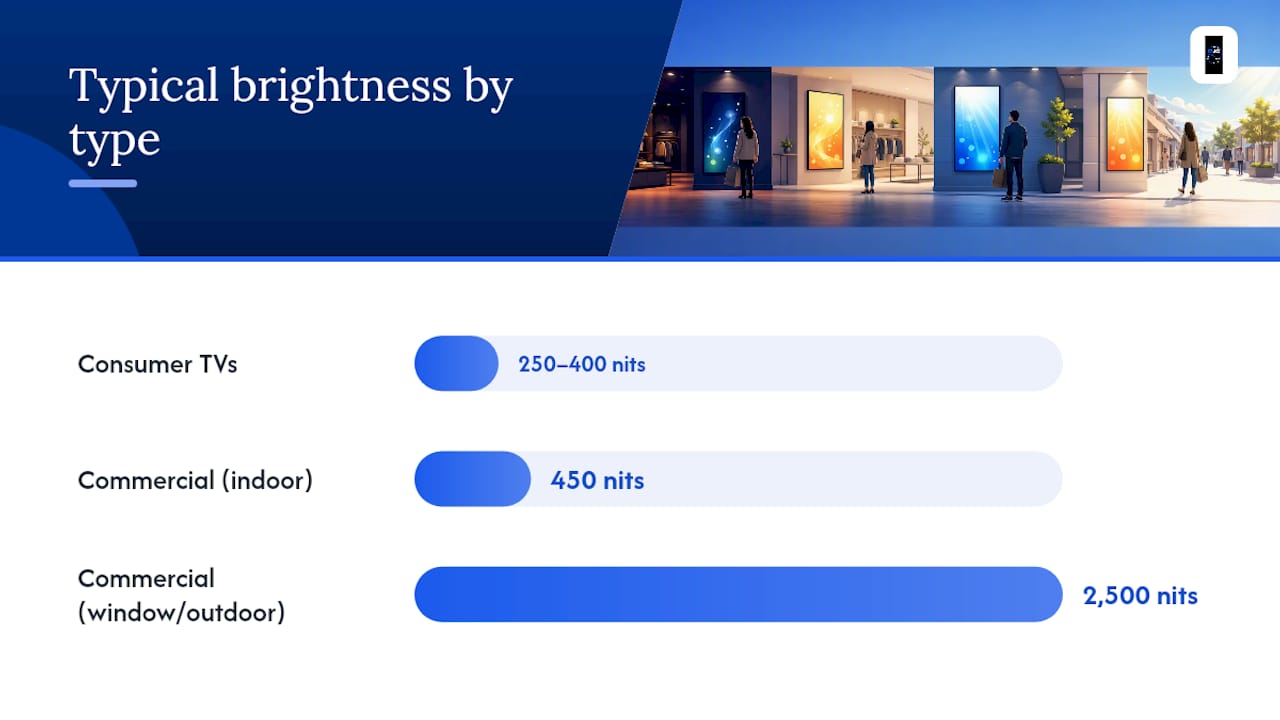
Brightness is the other gap. Commercial displays typically start around 450 nits for indoor use and can reach 2,500 nits for window and outdoor placement, while most consumer TVs sit between 250 and 400 nits, which washes out in direct sunlight.
- Duty cycle rating built for always-on operation, not evening binge-watching.
- Portrait-mode chassis and internal cooling designed for vertical mounting.
- Enterprise warranties with on-site repair, versus consumer coverage that often requires shipping the unit away.
A consumer TV can still work for a low-visibility back-office menu board or a staff break room display. Anywhere a customer sees it every day, that shortcut costs more in replacements than it saved upfront.
What Content Actually Works on Retail Screens?
Message length has to match how long someone actually looks at the screen. Yodeck's dwell-time guidance recommends 3 to 7 words or a few seconds of motion for passing foot traffic, and reserves 15 to 30 second clips for captive audiences at checkout or a kiosk.
- Promotions and pricing rotate fastest and belong near the product they reference, not buried in a generic loop.
- Product demos and how-to clips work best for items that need explanation, positioned near the shelf where the confusion actually happens.
- Social proof and reviews perform well next to high-consideration purchases, where a shopper is already hesitating.
- Operational messages (hours, curbside pickup, return policy) reduce staff interruptions when placed near the entrance.
- Live data feeds like loyalty point balances or local weather add relevance without needing constant manual updates.
Dayparting lets a breakfast promotion swap automatically for a lunch special without anyone touching the CMS at 11 a.m.
Pro Tip: Pair every promotional screen with a QR code or short URL tied to a trackable landing page. Without that, you're guessing at what the screen actually sold.
What Installation and Connectivity Does Digital Signage Need?
Uptime problems almost never start with the screen. They start with the network, the power, or a mounting bracket installed without checking ventilation clearance.
- Wired Ethernet is the reliable default for customer-facing screens; Wi-Fi introduces a failure point you can't always diagnose remotely.
- Power over Ethernet (PoE) simplifies installs where running a separate power line is impractical.
- A site survey should check power access, ventilation around the chassis, and whether the mount supports the display's actual weight in portrait orientation.
- Structured cabling and managed switches keep a multi-screen rollout from turning into a rat's nest of extension cords.
- Remote diagnostics catch an offline screen at 6 a.m. instead of waiting for a shift manager to notice at 9.
A signage vendor who skips the site survey is asking for a return visit. That's a cost most quotes don't mention until it happens.
What Does Digital Signage Cost, and How Do You Measure ROI?
Budget across five line items: the displays themselves, media players or SoC hardware, the CMS subscription, installation and cabling, and an ongoing maintenance allowance. Skipping the last one is the most common way retailers get surprised a year in.
- Track proof-of-play uptime to confirm content actually aired as scheduled.
- Measure impressions and dwell time where the CMS supports it.
- Correlate screen campaigns with POS data to catch conversion lift at specific registers.
- Run a single-store pilot before committing to a full rollout, then calculate payback from basket-size increases or attach-rate gains.
Vendor pricing runs from flat hardware purchase to subscription-based CMS licensing. Ask for both models before you sign anything.
How Do You Buy and Install Digital Signage the Right Way?
A procurement process that skips steps is how retailers end up with mismatched hardware and a CMS nobody on staff can actually use.
- Define the goal — sales lift, dwell time, checkout upsell, or brand consistency across locations.
- Map screen types to zones using the placements covered above.
- Set a budget that includes installation and a year of maintenance, not just hardware.
- Run a site survey to confirm power, network, and mounting feasibility.
- Pilot in one location before rolling out chain-wide.
- Scale the rollout once the pilot data justifies it.
When you're in a vendor demo, ask directly about warranty scope, whether the CMS logs proof-of-play, who handles installation, and what the response time is on a service ticket. A vendor that can't answer the installation question clearly is subcontracting it, which is exactly where finger-pointing starts when something breaks.
Pro Tip: Ask to see a live remote monitoring dashboard during the demo, not a screenshot. If they can't show you a real screen's status in real time, that feature probably doesn't work the way the brochure claims.
Notes From the Field: What Actually Breaks Retail Signage Installs
Most signage failures trace back to three things: a Wi-Fi dead zone near the mounting point, no ventilation clearance behind a portrait-mounted display, or cabling run without planning for future screens. DJC Engineering's accredited, non-subcontracted installation model exists specifically to catch these before they become service calls.
A proper quote should always include a full site survey and a maintenance plan, not just a hardware list. That's the difference between a screen that runs for years and one that needs a truck roll every quarter.
— Dylan
Get Retail Signage Installed Right the First Time
A professional installer offering a licensed, accredited, non-subcontracted service scopes, installs, and configures the whole system, cabling, mesh Wi-Fi, and displays as one integrated job with a high first-visit fix rate.

That matters most for retail signage because so many failures trace back to connectivity, not the screen itself. Djcengineering's structured cabling and networking services cover the managed switches, wireless access points, and PoE runs that keep multi-screen setups online, while the audio visual team handles TV wall mounting, recessed power, and video wall integration for flagship locations. For stores with weak fixed-line internet, Starlink and NBN installation keeps the CMS connected without downtime.
The path is straightforward: a site survey, a fixed-scope quote, professional installation, and ongoing support if you need it. If your next step is a retail signage rollout in South East Queensland, start with an IT and networking enquiry to get the connectivity side scoped properly before a single screen goes on the wall.
Sources
- Retail Digital Signage Software for Stores and Chains | Disign
- Digital Signage Content: 30+ Ideas, Examples & Strategy Guide
- Why you shouldn't use consumer TVs for commercial digital signage - Samsung Business Insights
- Digital Signage for Retail Stores | BrightSign®
FAQ
What Is the Difference Between Digital Signage and a Regular TV?
Digital signage uses commercial-grade displays rated for continuous, all-day operation with a cloud CMS for content control, while a regular TV is built for a few hours of evening use and isn't rated for that duty cycle.
How Much Does Digital Signage Cost for a Retail Store?
Costs vary by display count, CMS subscription, and installation complexity; Djcengineering doesn't publish fixed signage packages, so get a scoped quote through its audio visual services page.
Can I Use a Regular Smart TV for Store Signage?
You can for low-visibility, non-customer-facing spots like a staff break room, but customer-facing screens need commercial displays built for higher brightness and continuous duty cycles.
How Long Should a Digital Signage Message Be?
Match it to dwell time: 3 to 7 words or brief motion for passing foot traffic, and 15 to 30 seconds for captive audiences at checkout or a kiosk.
Do I Need Wired Internet for Digital Signage, or Is Wi-Fi Enough?
Wired Ethernet is the more reliable choice for customer-facing screens; Wi-Fi works but adds a diagnosable failure point, especially in stores with dead zones near the mounting location.