
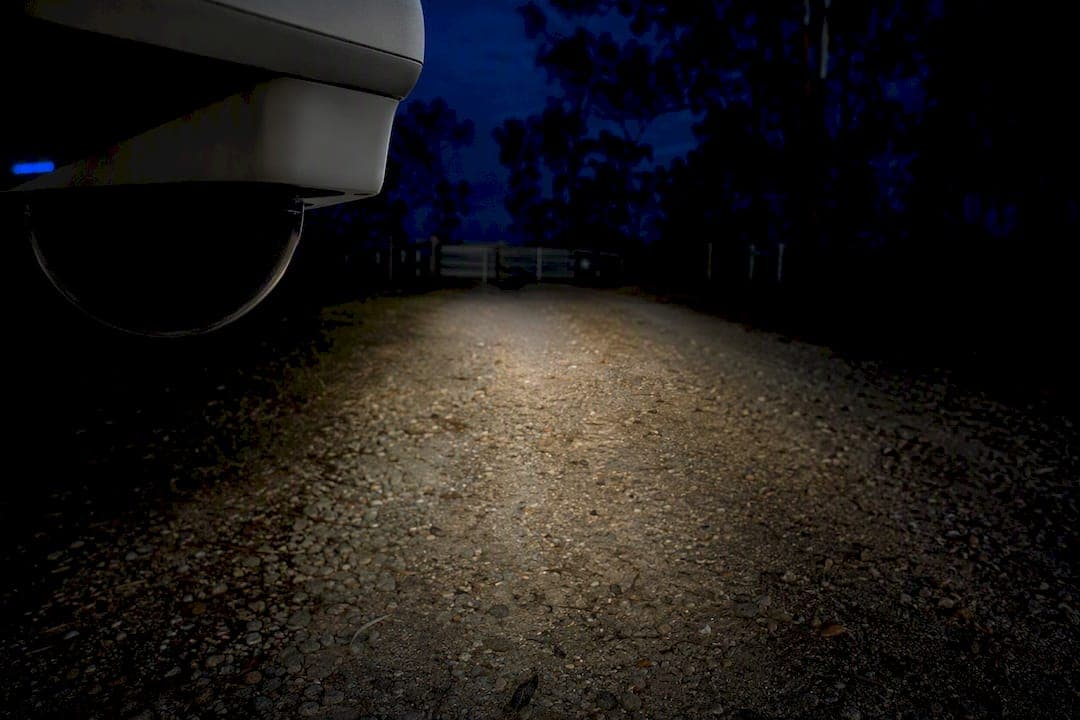
For most homes and small businesses, a PoE camera with a starlight sensor or full-color night mode, matched to your actual lighting conditions, beats generic infrared every time. IR still wins for long, dark driveways or rural boundaries where identification matters more than color. If you're not sure which fits your property, test a single color-capable camera at your front entry before buying a full system, or book a short site survey to get lux levels mapped properly.
TL;DR:
- Infrared cameras provide reliable, cost-effective night vision but produce monochrome footage with limited range and identification accuracy.
- Full-color systems and starlight sensors capture detailed, color-night footage in ambient light but require visible illumination and higher power consumption.
- Sensor size and aperture are the most critical specs for low-light performance, with larger sensors and wider apertures offering better night image quality.
- Proper placement, including mounting height, angle, and avoiding glare, significantly influences night footage clarity and identification ability.
- A professional site survey with lux mapping, weather considerations, and privacy masking planning ensures optimal camera performance tailored to specific property conditions.
Table of Contents
- How Night Vision CCTV Actually Works: IR, Color, and Thermal
- Which Camera Specs Actually Matter for Night Performance?
- DIY Kits, PoE Systems, Wireless Cameras, or a Professional Install?
- Installation and Placement Rules That Make or Break Night Footage
- Privacy Masking and Compliance for Night-Vision Systems
- Why a Proper Site Survey Beats Guesswork Installation
- Keeping Night Vision Cameras Working: Cleaning, Firmware, and IR Reflection
- Keeping Cameras Running Overnight: Power and Backup Options
- What Night-Vision CCTV Actually Costs in Australia
- Connecting Night Vision Cameras to Apps and Monitoring Systems
- How Weather and Temperature Affect Night-Vision Cameras
- My Take: Skip the Spec-Sheet Arms Race
- Get Your Night Vision CCTV Properly Surveyed and Installed
- Sources
- FAQ
How Night Vision CCTV Actually Works: IR, Color, and Thermal
Night vision CCTV isn't one technology. It's four different approaches, each solving the darkness problem a different way, and picking the wrong one is the single most common mistake we see in home and small-business setups.
Infrared (IR) illumination is the oldest and still the most common. The camera fires invisible infrared light onto the scene, and its sensor reads the reflected light back as a monochrome image. This is why classic security footage looks green or gray. IR is cheap, reliable, and works in total darkness, but it produces flat, colorless footage that's harder to use for identifying clothing or vehicle color, and it has a hard falloff range where the image just turns to noise.
Low-light or "starlight" sensors take a different approach. Instead of adding light, they use a larger, more sensitive sensor to gather whatever ambient light already exists, moonlight, streetlight spill, a porch bulb, and amplify it electronically. The result is a genuine image rather than an IR-lit one, and in many cases it still renders in color when there's enough ambient light to work with.
Full-color or "24/7 color" systems (the category that includes ColorVu-style cameras) push this further by pairing a large-aperture lens with a bigger sensor and a burst of supplementary white light, either a built-in LED or a warm floodlight. Larger apertures like f/1.0 combined with bigger sensors and stronger image processing let these cameras capture genuine color even in near-dark conditions, not just when the sun is barely up. The trade-off is that the white light is visible, which some neighbors and clients don't love, and it draws more power than passive IR.
Thermal imaging works completely differently again. It detects heat signatures rather than visible or infrared light, so it doesn't care about darkness, fog, or even light smoke. Thermal is excellent for detecting that something is there (a person walking a perimeter at 2 a.m.) but poor for identification, since you get a heat blob, not a recognizable face or number plate. It's mostly reserved for large industrial sites, rural boundary lines, or perimeter detection layered in front of a standard camera.
Combining a sensor-sensitivity approach with intermittent white-light illumination often gives the most balanced day-to-day result for suburban homes, since it avoids running a spotlight all night while still allowing color capture the moment motion is detected.
Here's how the four technologies stack up in practice:
- IR cameras are cheapest and most reliable in pitch darkness, but footage is monochrome and range is capped by the illuminator's power.
- Starlight/low-light sensors capture more natural detail using existing ambient light, with no visible illumination given off.
- Full-color/24/7 color cameras deliver identifiable color footage at night, at the cost of visible light output and higher power draw.
- Thermal cameras detect presence and movement through fog, smoke, and total darkness, but can't identify faces or plates.
A driveway with a working streetlight is a different problem than a rural gate with zero ambient light, and the camera that solves one will underperform on the other.
Which Camera Specs Actually Matter for Night Performance?
Datasheets are where most buyers get misled, because manufacturers highlight the number that looks best, not the one that predicts real performance. Here's what to actually check.
Sensor size is the single biggest driver of low-light image quality. A larger sensor, physically, not in megapixels, captures more light per pixel, which is why two "4K" cameras can perform completely differently at night despite matching resolution numbers. If a spec sheet doesn't list sensor size (usually in inches, like 1/1.8" or 1/2.8"), that's a red flag, not a neutral omission.
Aperture (f-number) works alongside sensor size. A lower f-number, f/1.0 versus f/1.6, means a wider opening and more light reaching the sensor. This is why full-color night cameras lean on large apertures paired with big sensors rather than sensor size alone.
Lux rating is the most abused number on any spec sheet. Manufacturers test "0 lux" performance with their own IR or white light active, which tells you almost nothing about performance without that light. Ask instead: what's the lux rating without supplementary illumination, and does the datasheet specify the testing conditions? If it doesn't, treat the number as marketing.
Frame rate at night often drops well below the daytime spec. Some budget cameras that claim 30fps in daylight fall to 5 to 10fps in low light because the sensor needs longer exposure to gather enough light. That's fine for a static porch view, but it will blur a person walking past a gate.
IR type and range need a reality check too. A datasheet claiming 30 meters of IR range assumes an open, unobstructed scene with a dark, non-reflective background. Realistic testing tells a more useful story: modern consumer cameras with strong sensors and IR arrays can deliver roughly 30 meters (about 98 feet) of genuinely usable night coverage under good conditions, and that's from cameras designed and tested specifically for this. Cheaper cameras claiming similar numbers on paper often fall well short in practice, especially once you account for glass, mesh fencing, or foliage in the frame.
Supporting features shape whether footage holds up in a real incident. Wide Dynamic Range (WDR) prevents headlights or a porch light from blowing out the rest of the frame into silhouette. Digital Noise Reduction (DNR) cleans up the grain that low-light sensors produce, though overly aggressive DNR can smear moving detail. Compression format matters more than people expect too: H.265 stores the same footage in roughly half the space of H.264, which affects how many days of retention your storage budget actually buys.
Here's a fast way to read any camera datasheet before you buy:
- Check sensor size first (look for a fraction like 1/1.8"), not megapixel count.
- Find the aperture (f-number); lower means better low-light capture.
- Look for the lux rating without illumination assistance, if it's not listed, ask the vendor directly.
- Confirm frame rate at night, not just the daytime maximum.
- Get a realistic IR or color-range figure, ideally backed by a real test image.
- Confirm WDR is present if the camera faces any direct light source (streetlights, headlights, sunrise/sunset glare).
- Check the compression format (H.265 or better) against your storage plan.
DIY Kits, PoE Systems, Wireless Cameras, or a Professional Install?
The format you choose affects night performance as much as the camera itself does, because power delivery and network stability determine whether that expensive sensor actually gets to do its job.
DIY kits (the boxed 4 or 8-camera sets sold as a bundle) are the fastest path to coverage and usually the cheapest upfront. The catch: kit cameras are almost always built to a price point, meaning smaller sensors, basic IR, and compressed processing. They're a reasonable choice for a single-entry monitoring setup on a tight budget, less so for a property that genuinely needs identification-quality footage at night.
PoE (Power over Ethernet) wired systems run both power and data over a single cable back to a network video recorder. This matters for night vision specifically because IR illuminators and white-light spotlights are power-hungry, and a stable, dedicated power feed avoids the brownout flicker that can plague battery or Wi-Fi cameras running high-draw illumination. PoE systems also tend to run on ONVIF-compliant hardware, which gives more flexibility to mix camera brands without losing NVR compatibility.
Wireless cameras trade some of that consistency for installation simplicity. They're genuinely useful for rental properties, sheds, or spots where running cable isn't practical. But Wi-Fi congestion, battery drain from IR use overnight, and weaker sensors in most wireless models mean night footage is usually the first thing to suffer compared with a wired equivalent.
What tends to separate a DIY job from one worth calling a professional for:
- Complex or mixed lighting conditions (busy street frontage, multiple entry points, glass doors) benefit from a lux-mapped installation rather than guesswork placement.
- Identification-grade requirements (a business needing plate or face recognition for insurance or legal purposes) need proper lens selection and mounting height calculated in advance.
- Larger properties or rural blocks where cable runs, power budgeting, and IR overlap between cameras get genuinely complicated fast.
- Anywhere PoE switch capacity or storage sizing needs planning, since undersized NVR storage is one of the most common causes of "we didn't have footage when we needed it."
Budget-wise, expect DIY kits to sit at the low end of the market, PoE component systems to cost more upfront but less in long-term reliability, and a fully surveyed professional install to carry a higher initial quote that reflects lux mapping, cable routing, and commissioning, not just hardware. Djcengineering's technical guide to commercial CCTV design breaks down what a proper site survey actually covers if you want to see the level of detail involved before committing either way.
Installation and Placement Rules That Make or Break Night Footage
Even the best sensor in the world produces useless footage if it's mounted wrong. Placement is where most night-vision performance is won or lost, well before anyone reviews a spec sheet.
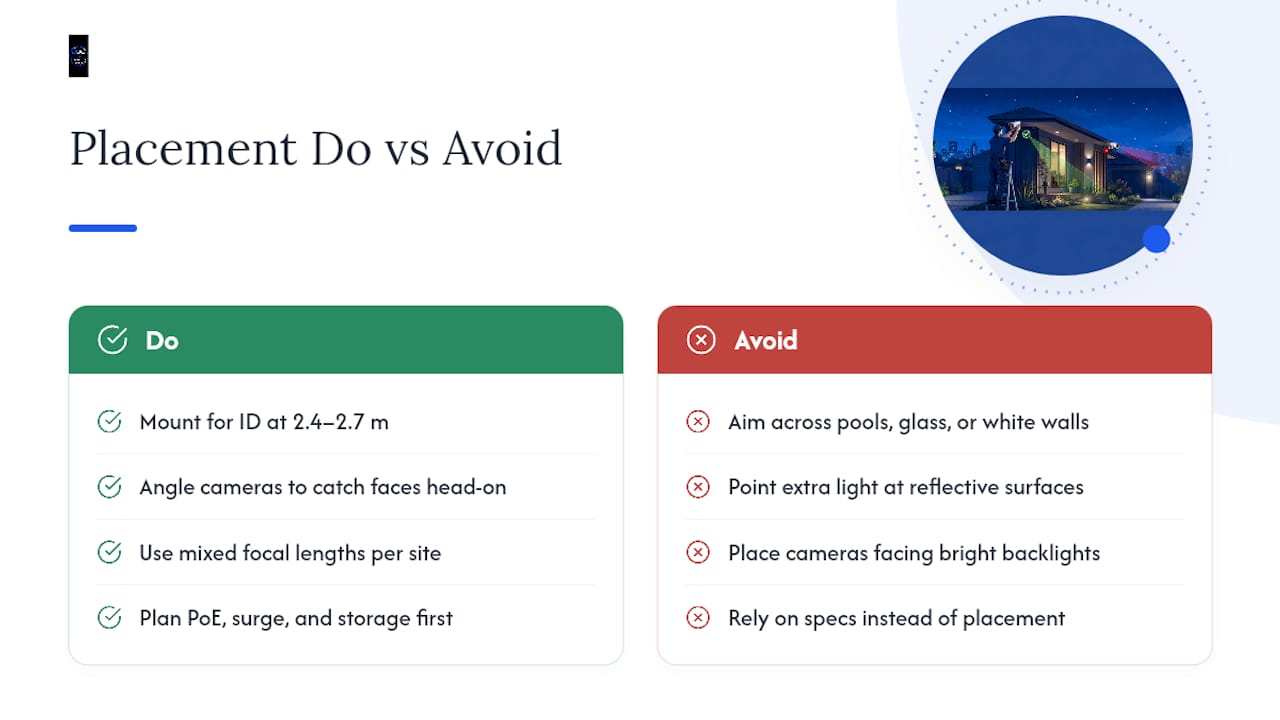
Mounting height and angle depend entirely on your goal. A camera aimed for facial identification needs to sit lower, roughly 2.4 to 2.7 meters, angled to catch faces head-on rather than the top of people's heads. A camera covering perimeter detection (spotting movement along a fence line) can mount higher and wider, sacrificing identification detail for broader coverage.
Glare and reflective surfaces wreck more night footage than any other single factor. A camera aimed across a pool, a white rendered wall, or through a glass door will bounce IR straight back into the lens, washing out everything in frame. Reposition the angle before you add more illumination; more light pointed at a reflective surface just makes the problem worse.
Backlighting from streetlights, neighboring security lights, or even a rising sun in the camera's field of view causes silhouetting, where a person becomes an unreadable dark shape against a bright background. This is exactly what WDR is built to compensate for, but placement still matters more than the spec.
Focal length decides the trade-off between wide coverage and identification detail. A wide-angle lens covers more ground but shrinks faces and plates to a handful of unusable pixels at any real distance. A longer focal length narrows the field of view but keeps enough resolution on target for identification. Most properties need a mix, wide for general awareness, narrower for the gate or entry point that actually matters.
Power and network planning rounds out the list. IR illuminators and white-light spotlights are among the biggest power draws in a CCTV system, so PoE budgeting (how much wattage your switch can actually supply across every connected camera) needs to happen before installation day, not after cameras start dropping offline at night when draw peaks. Surge protection matters too, especially on rural properties where storm activity is more common. Storage sizing should be calculated against your chosen resolution, frame rate, and retention period, not just picked as "the biggest hard drive available."
Djcengineering's guide on where to mount every camera walks through height, angle, and field-of-view diagrams in more depth if you're planning placement yourself before a survey.
Privacy Masking and Compliance for Night-Vision Systems
Night-vision cameras often see more than daytime footage ever will, motion-triggered white light and wide IR coverage tend to sweep across footpaths, neighboring windows, and shared driveways. Getting the masking strategy right at design time avoids awkward conversations later.
Static masking permanently blocks a defined region of frame, a neighbor's window, a shared laneway, an ATM screen, and stays fixed to the camera's coordinates. Static masks are useful for permanently excluding sensitive areas and remain valid on fixed cameras or even PTZ units once anchored to the camera's coordinate system. It's the simpler, cheaper option and works well when the sensitive area never changes.
Dynamic, AI-based masking works differently, blurring people, faces, or license plates in real time as they move through frame rather than blocking a fixed region. AXIS Live Privacy Shield runs this kind of edge-based processing directly on compatible cameras, meaning the masking happens on the device itself rather than requiring a separate server, which simplifies scaling for larger properties. The trade-off: performance depends on stable lighting and scene complexity, and Axis specifically recommends motion-based masking for consistent indoor conditions rather than chaotic outdoor scenes with heavy shadow or glare.
A practical operational pattern many businesses land on is running a masked live view for day-to-day monitoring, while keeping a separate, access-controlled path to unmasked footage for genuine incident investigation. That balances everyday privacy with the ability to actually use footage when something happens.
Designing surveillance with privacy built in from the start, rather than adding redaction after the fact, tends to cost less and cause fewer compliance headaches down the line.
- Static masking suits fixed, unchanging sensitive zones like a neighbor's window or a cash register screen.
- Dynamic masking suits scenes with moving people or vehicles where blanket blocking isn't practical.
- Masked live view plus controlled forensic access balances daily privacy against incident investigation needs.
Whichever approach fits your site, it's worth raising during the site survey rather than retrofitting afterward, since camera selection (does it support edge-based masking at all) depends on decisions made before installation.
Why a Proper Site Survey Beats Guesswork Installation
Complex lighting, high-identification requirements, or a commercial site with insurance and compliance obligations are exactly when a professional site survey earns its cost. Djcengineering's approach to CCTV design starts with lux mapping at each proposed camera position, so illumination decisions (IR, starlight, or full-color) are based on measured conditions rather than assumptions.
A proper survey also maps cable routing, budgets PoE power draw across the full camera count, and sizes NVR storage against your chosen resolution and retention period, alongside a privacy masking plan where the site calls for one. That's the difference between a system that looks fine on a spec sheet and one that actually performs at 2 a.m. on a moonless night.
That last figure matters more than it sounds: a camera reinstalled or reconfigured three times to fix a glare problem is a camera that wasn't surveyed properly the first time.
Keeping Night Vision Cameras Working: Cleaning, Firmware, and IR Reflection
Night-vision performance degrades quietly over time, and most of the causes are avoidable with basic maintenance.
Lens cleaning matters more for IR cameras than daytime-only units, since dust, cobwebs, or a thin film of pollen sits directly in the IR beam's path and scatters light straight back into the lens, creating a washed-out, foggy image at night that looks fine during the day. A soft microfiber cloth and a check every few months, more often near gardens or coastal salt air, keeps this from creeping up unnoticed.
Firmware updates aren't just a security formality. Manufacturers regularly ship improvements to noise reduction, exposure handling, and IR timing in firmware releases, meaning a camera can genuinely see better at night after an update than it did the day it was installed. Skipping updates for years is one of the more common, and easily fixed, reasons a system underperforms its original spec.
IR reflection issues, that washed-out white blob in the middle of an otherwise dark frame, usually trace back to something reflective sitting too close to the lens: a spiderweb, a nearby window, rain-slicked ground, or foliage that's grown into the IR beam's path since installation. The fix is almost always physical, trim the foliage, reposition the angle, or add a lens hood, rather than a settings change. If reflection issues persist despite a clear lens and reasonable angle, it's often the illuminator itself is misaligned with the sensor's actual field of view, which points to an installation issue rather than a maintenance one.
Keeping Cameras Running Overnight: Power and Backup Options
Night vision is the most power-hungry mode most CCTV cameras run, between IR illuminators, white-light spotlights, and the processing overhead of dynamic masking or analytics, so power planning deserves real attention rather than an afterthought.
PoE systems centralize this risk conveniently: if the switch loses power, every connected camera goes dark at once. Pairing a PoE switch with a small UPS (uninterruptible power supply) is one of the cheapest insurance policies available, buying enough runtime to ride out a short outage or, at minimum, ensure a graceful shutdown that doesn't corrupt NVR storage.
Wireless and standalone cameras often run on battery packs, which work fine for lower-draw IR use but drain considerably faster when white-light or color-night modes fire repeatedly through the night. If your property has frequent overnight motion, wildlife, passing traffic, a battery-only camera may need daytime solar top-up just to survive till morning.
Solar power is increasingly viable for rural gates, remote sheds, and boundary cameras where running mains power isn't practical. A properly sized solar panel and battery combination can sustain a single camera through most Australian conditions, though heavy cloud cover for multiple consecutive days remains the main failure point worth planning around.
For anything beyond a single camera, a dedicated UPS sized to your PoE switch's total wattage draw, illuminators included, is the most reliable way to guarantee footage keeps recording through a blackout, which is statistically one of the more common times an intrusion actually happens.
What Night-Vision CCTV Actually Costs in Australia
Costs break into three buckets: hardware, installation, and ongoing operation, and skipping the third one is where most budgets go wrong.
Purchase price for a basic 4-camera IR kit sits at the budget end of the market, while individual full-color or starlight-sensor cameras with larger apertures and stronger processing cost noticeably more per unit. Thermal cameras remain the most expensive category by a wide margin and are rarely justified outside commercial or rural boundary applications.
Installation fees vary depending on cable runs, mounting complexity, and whether a full site survey with lux mapping is included. A straightforward residential install with existing cable pathways costs less than a commercial job requiring new conduit runs, PoE switch installation, and NVR commissioning across multiple buildings.
Ongoing operational costs are the bucket most buyers forget entirely: cloud storage subscriptions if you're not recording locally, electricity draw from always-on illuminators and NVR hardware, occasional lens replacement, and firmware or software support if the system includes AI analytics or masking features. A UPS battery also needs periodic replacement, typically every few years, to keep backup power genuinely reliable rather than just present.
The cheapest system on paper is rarely the cheapest system over five years, once storage subscriptions, reinstallation from poor initial placement, and battery replacement get factored in.
Connecting Night Vision Cameras to Apps and Monitoring Systems
Footage sitting on a hard drive nobody checks isn't security, it's just archiving. Real-time integration is what turns a night-vision system into an actual deterrent and response tool.
Most modern NVR and camera systems connect to a mobile app for live viewing, push notifications on motion detection, and remote playback, meaning a triggered alert at 3 a.m. can be checked from bed rather than discovered the next morning. This matters specifically for night vision because that's when most triggered events actually happen, and the value of full-color or starlight footage is largely wasted if nobody sees the alert until hours later.
Integration with a broader alarm or access control system adds another layer: a triggered door sensor can automatically pull up the relevant camera feed, or a monitored alarm center can review live footage before deciding whether to dispatch a response. ONVIF-compliant PoE systems generally offer the most flexibility here, since they're built to interoperate with third-party analytics and monitoring platforms rather than locking you into a single closed app ecosystem.
For businesses, this integration piece often matters more than camera specs alone, a perfectly good night-vision camera feeding into an app nobody checks and an alarm system it doesn't talk to delivers a fraction of the value of a properly integrated setup.
How Weather and Temperature Affect Night-Vision Cameras
Night-vision hardware works harder in bad weather, and understanding where it struggles helps set realistic expectations.
Fog and heavy rain scatter IR light in much the same way they scatter visible light, which is why IR range claims shrink dramatically in poor weather regardless of what the datasheet promised. Thermal cameras handle light fog and smoke better than IR or color sensors, since they're detecting heat rather than reflected light, but heavy rain still degrades even thermal performance somewhat.
Temperature extremes affect both the camera's electronics and its housing. Most consumer and commercial cameras are rated for a specific operating range, commonly somewhere around negative 10 to positive 50 degrees Celsius, and exceeding that on either end can cause condensation inside the housing, sensor drift, or in extreme heat, thermal shutdown to protect the internal components.
Weather resistance ratings (commonly IP66 or IP67) indicate how well a camera resists dust and water ingress, and this matters more for night-vision units specifically because condensation or moisture inside the housing tends to fog the lens exactly when IR illumination needs a clear path. A camera rated for indoor use mounted under an exposed eave will fail faster than its outdoor-rated equivalent, regardless of how good its night sensor is on paper.
Choosing hardware rated appropriately for your actual climate, coastal salt exposure, inland heat, or frost-prone regions, matters as much as sensor quality when the goal is footage that still performs three years after installation.
My Take: Skip the Spec-Sheet Arms Race
Most people researching night vision CCTV get pulled into comparing lux numbers and IR-range claims that don't reflect how the camera performs on their actual property. That's backwards. Your driveway's ambient light, your neighbor's security light spill, the reflective surfaces near your entry, those variables matter more than any number on a box.
If you're a homeowner with a fairly typical suburban block, test a single full-color or starlight camera at your main entry point before committing to a whole system. If you're running a business, or your property has genuinely tricky lighting, a rural boundary, mixed glass and reflective surfaces, skip the guesswork and get a proper survey. And build privacy masking into that decision from day one, not as a fix applied after someone complains. It's far cheaper to plan for it than retrofit it.
— Dylan
Get Your Night Vision CCTV Properly Surveyed and Installed
Comparing spec sheets only gets you so far. Djcengineering replaces the guesswork with an actual lux-mapped site survey, then designs and installs the system around what your property genuinely needs, not a generic kit configuration.

For rural properties, some installers also handle Starlink and NBN connectivity alongside the security build, so remote monitoring can stay online when needed.
Before reaching out, have a few things ready: photos of your entry points and problem areas at night, your priority list (identification versus general coverage), and a rough budget range. That lets the survey focus on what matters instead of starting from scratch.
Head to the IT and networking installation page to see the full scope of services, or go straight to the enquiry page to request a quote and get a site survey booked.
Sources
The technical claims in this guide draw from manufacturer documentation and independent testing rather than marketing copy alone.
- AXIS Live Privacy Shield | Axis Communications
- The Best Outdoor Home Security Cameras of 2026, Backed by Over 200 Hours of Testing - CNET
- Night Vision on Security Cameras Explained
FAQ
Does CCTV Have Night Vision?
Most modern CCTV cameras include some form of night vision, whether infrared, low-light sensor, or full-color technology, but the quality varies enormously between budget and professional-grade models. Always check the specific illumination type and realistic range before assuming a camera performs well after dark.
Is It Legal to Own Night Vision CCTV in Australia?
Yes, owning and installing night-vision CCTV cameras is legal in Australia for standard residential and commercial security purposes. Privacy obligations still apply to where cameras point and how footage is stored or shared, which is why masking neighboring properties and shared spaces is worth planning at installation.
What Is the Best CCTV for Night Vision?
There's no single best option, it depends on your property's lighting and identification needs. A full-color camera with a large sensor and wide aperture suits well-lit suburban entries, while a strong IR or starlight camera suits dark rural boundaries where identification range matters more than color.
How Far Can Night Vision CCTV See?
Under good conditions, modern consumer cameras with strong sensors can deliver roughly 30 meters (about 98 feet) of genuinely usable night coverage, though obstructions, weather, and cheaper hardware often reduce that range significantly in practice.
Should I Choose a Wired or Wireless Night-Vision Camera?
Wired PoE systems generally deliver more consistent night performance because IR illuminators and white-light modes draw significant power that battery or Wi-Fi cameras can struggle to sustain overnight. Wireless suits low-traffic spots where running cable isn't practical, but expect some trade-off in image consistency after dark.
Recommended
- CCTV Cameras Installation Brisbane: How to Engineer a High-Performance Security System
- CCTV Installation Gold Coast: The Technical Checklist for High-Performance Security
- Security Camera Installation Gold Coast: High-Performance Surveillance Engineering
- Commercial CCTV Security: A Professional Guide to High-Performance Surveillance