
If your business would lose real money the moment your internet drops, business NBN is worth the premium. If a dropout just means you tether your phone for twenty minutes, residential NBN is fine. The three signals that decide it: how much an outage actually costs you, whether you need a static IP for hosted services or remote camera access, and whether your work leans on heavy uploads or VoIP calls. Get those three answers first, because most of what follows is just explaining why they matter.
TL;DR:
- Business NBN plans typically include service level agreements with rapid fault restoration, static IP options, and higher upload speeds, unlike residential plans.
- Small businesses with critical online operations should consider the cost of outages against the plan premium, generally paying off if outages exceed a few hundred dollars in value.
- Proper installation, including site surveys and structured cabling, significantly improves real-world performance, especially for VoIP and CCTV systems.
- Most small operators can rely on residential plans if they have a failover backup, operate without static IPs, and do not require guaranteed uptime during business hours.
- Asking providers about SLA response times, static IP costs, and capacity management during peak hours helps determine whether a business plan is necessary.
Table of Contents
- NBN Business vs Residential: The Real Technical Differences
- How Do You Decide Between Business and Residential NBN?
- What Does the Price Gap Actually Buy You?
- Installation, Upgrades and Eligibility for Business Connections
- When Is Residential NBN Actually Enough?
- Why Professional Installation Closes the Gap Between the Plan and Reality
- A Straight Answer for Small Business Owners
- Get Your Connection Actually Working Like a Business Plan Should
- Where to Verify These Details Yourself
- Sources
- FAQ
NBN Business vs Residential: The Real Technical Differences
The fibre running to your building is identical whether you're on a $60 residential plan or a $150 business one. What changes is everything layered on top of it, and that's where the real differences between business and residential internet actually sit.
SLA and fault restoration. Residential plans run on "best efforts," meaning your provider will fix a fault when they get to it, often within a few business days. Business plans frequently carry contractual restoration targets. Some nbn Business Service tiers include monitoring and priority fault handling, and eligible business SLAs can commit to a four-hour restoration window rather than a vague "we'll look into it."
Static vs dynamic IP. Residential connections get a dynamic IP that changes periodically. That's a problem if you're running a VPN back to head office, hosting a small server, or need consistent remote access to a CCTV system. Business plans commonly offer a static IP as a standard or add-on feature, which residential plans rarely do without a workaround.
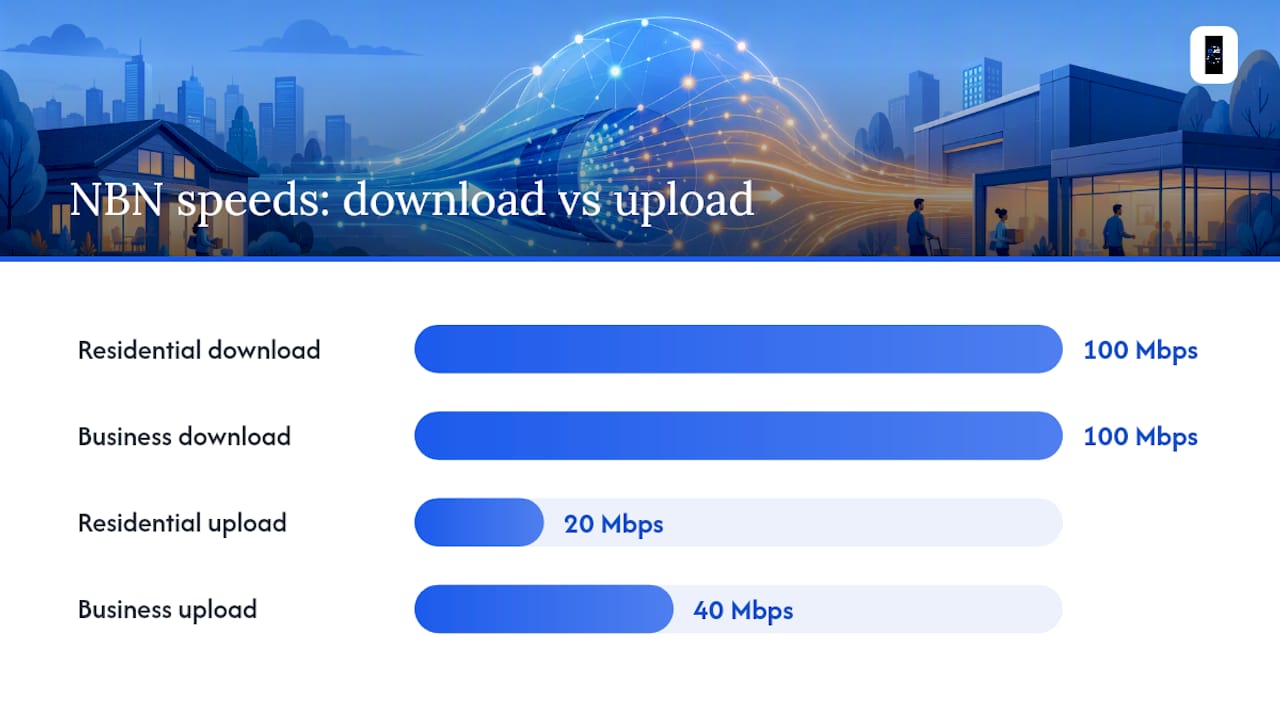
Upload speed. This is the one home users underestimate. A typical residential plan might offer 100/20 (100 Mbps down, 20 up), while a comparable business plan bumps that to something like 100/40. If you're pushing large files to cloud storage, running multiple video calls, or backing up servers overnight, that extra upload headroom is the difference between a smooth afternoon and a stalled screen share.
Contention and time-of-day performance. Residential providers report "typical evening speeds," measured during the 7pm to 11pm peak when everyone's streaming. Business products are more often benchmarked against business-hour performance, 9am to 5pm, which is when you actually need the bandwidth. Some retailers manage CVC (the capacity providers buy from NBN Co) separately for business customers, which can mean more consistent throughput during the workday even if the headline speed looks the same on paper.
Why it matters in practice:
- A dropped VoIP call mid negotiation costs more than the plan premium that would have prevented it.
- Slow uploads turn a five-minute cloud backup into a twenty-minute one, every single night.
- A dynamic IP that changes overnight can lock you out of your own CCTV footage until you reconfigure it.
Quick reference: Business plans typically add higher upload allowances (often 100/40 vs 100/20), static IP options, and defined SLA restoration targets, features residential plans generally don't include.
How Do You Decide Between Business and Residential NBN?
Run through this before you call a provider:
- Calculate your downtime cost. If your business stops earning or serving clients during an outage, multiply your average hourly revenue by how long a typical fault takes to fix on a best-efforts plan (often a day or more).
- Check your static IP dependency. If you run a VPN, a hosted server, remote CCTV access, or need a fixed address for any reason, that alone often justifies a business plan.
- Assess VoIP and video load. If phone calls or client video meetings are core to your day, upload consistency during business hours matters more than raw download speed.
- Count concurrent users. A rough sizing rule is 5 to 10 Mbps per active user for cloud-based work, then add 50 to 100 percent headroom for uploads and video calls.
- Test your backup plan. Decide now whether a 4G or 5G failover device makes sense, and actually test it during a simulated outage rather than assuming it'll work when you need it.
Pro Tip: When you call a provider, ask three specific questions: what's the SLA restoration target in hours, is a static IP available and at what cost, and how do they manage CVC or business pooling during peak hours? Vague answers to any of these are a warning sign.
If your business runs on a laptop and a phone with light cloud use, residential with a solid router will usually cover you, but consider professional computer and laptop repairs Brisbane services to keep your devices running reliably. If you're running four staff on video calls, a hosted booking system, and a phone system that can't drop, you're already in business-plan territory.
What Does the Price Gap Actually Buy You?
Expect to pay roughly $20 to $50 more per month for a business-grade plan compared to a similar-speed residential one. That premium usually buys the SLA, static IP option, and priority support already covered above, not a faster physical connection.
Here's the simple math: if a single business-hour outage costs you more than a few hundred dollars in lost work or missed bookings, a $30 monthly premium pays for itself the first time it prevents even one bad day. If your worst-case outage costs you $50 in delayed emails, the premium probably isn't worth it.
- Business contracts sometimes run for fixed terms with potential early exit fees, while many residential plans offer more flexible month-to-month terms.
- Promotional discounts on business plans may be time-limited, so it is important to check the ongoing pricing beyond initial offers.
- Some business plans bundle static IP and priority support into the base price; others charge extra for each.
Installation, Upgrades and Eligibility for Business Connections
Business installs get more flexibility than residential ones, and it shows up in small but practical ways. Residential NTD (the box where fibre enters your building) placement is typically limited to around 12 metres of internal cabling, while business installs can often extend that to 30 metres. That matters if your comms rack, server, or patch panel sits in a back office rather than right next to the front wall.
- FTTP upgrades: many FTTN and FTTC premises are eligible to request an upgrade to full fibre, and business customers often get priority scheduling for this.
- nbn Business Service: a wholesale product offering monitoring and faster restoration targets on the standard NBN network.
- Enterprise Ethernet: a dedicated fibre product built for medium and larger operations, offering 99.9% availability targets and prioritized traffic classes, though it requires a location eligibility check and isn't available everywhere.
- Lead times: business-grade installs and Enterprise Ethernet builds can take longer to schedule than a standard residential connection, so factor that into any office move or new fitout.
When Is Residential NBN Actually Enough?
Plenty of small operations run perfectly well on residential plans, and there's no reason to pay for features you'll never use.
- Sole traders and consultants doing email, invoicing, and occasional video calls rarely need a static IP or an SLA.
- Low-transaction retail or trades businesses where a short outage means a delayed text back to a customer, not a lost sale, can stay residential.
- Basic remote admin work without hosted servers or camera systems is usually fine on a well-set-up residential connection.
The warning signs that push you toward business-grade are specific: taking card payments through a system that needs a stable connection, running multi-person video collaboration daily, hosting your own server, or needing static-IP access to a CCTV system. If none of those apply, a wired connection, a decent router, backups scheduled for off-peak hours, and a cheap 4G failover dongle will cover most gaps for well under $20 a month in mitigation costs.
Why Professional Installation Closes the Gap Between the Plan and Reality
A business-grade plan with a badly placed router or tangled cabling still performs like a residential one. The plan is only half the equation. Djcengineering handles the other half: site surveys, structured cabling, managed switches, mesh WiFi tuned for the actual floor plan, and PoE CCTV design that accounts for static IP requirements from the start.
- Site surveys identify dead zones and cabling bottlenecks before they cause problems.
- Structured cabling and managed switches keep a comms rack tidy and easy to troubleshoot.
- Mesh WiFi design eliminates the dropouts that make video calls stutter, even on a fast plan.
- Failover integration connects a backup 4G or 5G link so an outage doesn't stop the business.
One recurring pattern: an NTD relocated into the comms room with proper cabling and a quality router resolves VoIP call drops that a customer had blamed on their NBN plan for months.
Pro Tip: Before you upgrade to a pricier business plan, get a site survey. Sometimes the bottleneck isn't the connection at all. It's the router sitting behind a filing cabinet three rooms from where you actually work.

A Straight Answer for Small Business Owners
Here's the rule of thumb I'd actually use: upgrade to business NBN if a single business-hour outage would cost you more than ten times the monthly premium. Below that line, residential with a solid failover plan usually wins on value.
Most small operators overestimate how often they'll need the SLA and underestimate how much a cheap 4G backup would have saved them last time the internet dropped. Measure the actual cost of downtime before you sign a 24-month business contract. Plenty of home-based businesses run fine on residential NBN for years, provided they've covered the basics: a wired connection where it counts, a router that isn't garbage, and a failover for the day it matters.
— Dylan
Get Your Connection Actually Working Like a Business Plan Should
Whether you land on residential or business NBN, the plan only performs as well as the setup behind it. Djcengineering is the local alternative to guessing your way through router placement and patchy WiFi. Its accredited team installs and configures every job in-house, no subcontractors, with a 98% first-visit fix rate across Starlink and NBN connections, structured cabling, and mesh WiFi tuned to your actual floor plan.

If you're running a CCTV system that needs static-IP remote access, or a VoIP setup that keeps dropping calls, a proper data cabling and network setup usually fixes more than switching plans ever will. Book a site survey with Djcengineering and find out whether your problem is the plan, or the wiring behind it.
Where to Verify These Details Yourself
For eligibility and wholesale specs, check nbn Co's own Enterprise Ethernet and small business plan pages. For sizing your connection to the number of staff you run, the NBN speed tiers breakdown is a useful starting point, and an NBN technology type check tells you what infrastructure actually reaches your address.
Sources
- NBN business vs residential internet — Thinkpickle
- Reviews
- What's the difference between business and residential NBN? — Caznet
FAQ
What Is the Difference Between Residential and Business Internet?
Business internet generally adds an SLA with fault restoration targets, static IP options, and higher upload allowances, while residential runs on a best-efforts basis with dynamic IP addressing. The underlying NBN fibre is the same network; the difference is the service layer on top of it.
Is It Legal to Run a Business From a Residential Property in Australia?
Running a home-based business is legal in most cases, but local council zoning rules and your lease or strata agreement may restrict certain activities like frequent client visits or heavy equipment use. Check with your local council before assuming your setup is compliant, since rules vary by region.
What Are the Key Differences Between Home and Business Broadband?
The main differences are SLA restoration commitments, static versus dynamic IP addressing, and upload speed allowances, with business plans often offering 100/40 uploads versus a residential 100/20. Business plans also typically report business-hour speeds rather than residential's typical evening speed figures.
Is There Any Difference Between NBN Providers?
Yes. Providers can differ in how they manage CVC capacity and business pooling, which affects real-world speed consistency even on plans with identical advertised speeds. It's worth asking any provider directly how they handle peak-hour capacity for business customers before signing a contract.
Does DJC Engineering Install Both Business and Residential NBN Connections?
Djcengineering handles Starlink and NBN installations for homes, businesses, and rural properties across South East Queensland, alongside structured cabling and mesh WiFi setup. Pricing for these services is available on request through the IT networking page.