
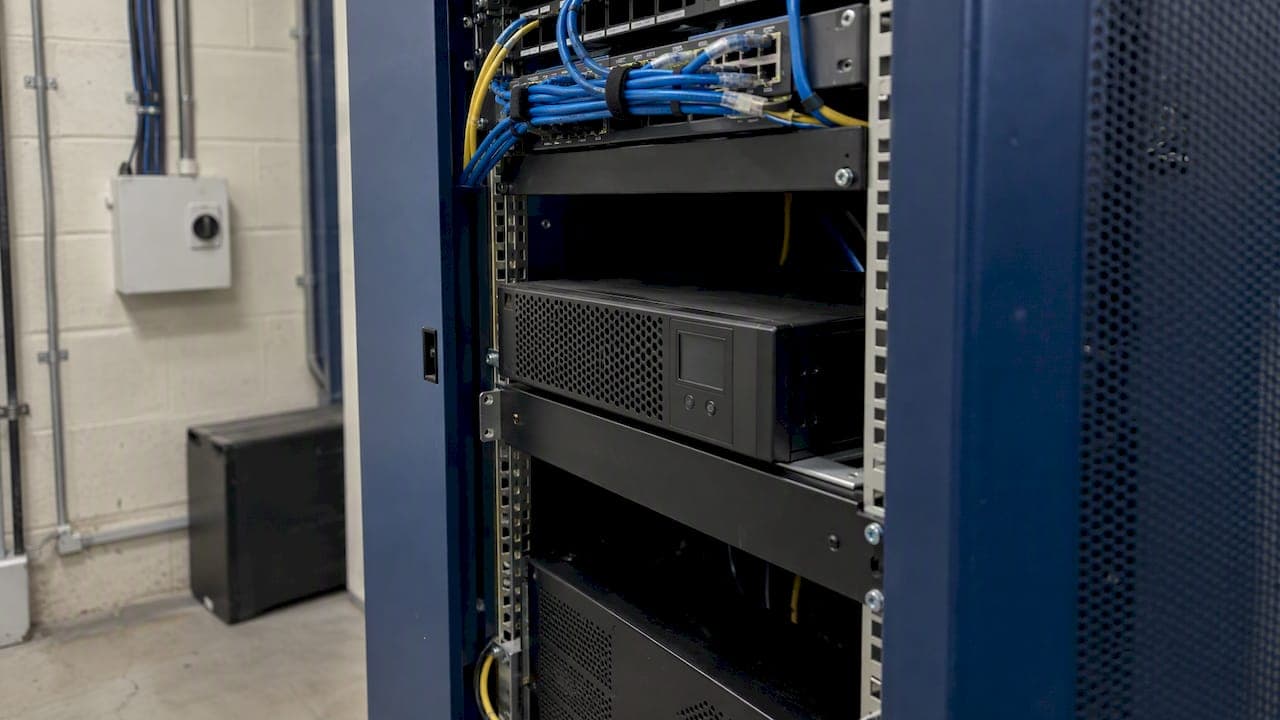
For most network racks, a compact 1U–2U line-interactive rackmount UPS is the right starting point. Step up to a short-base online model when mains power is poor or recording gear and servers are critical. The deciding rule is simple: the unit must fit your rack depth and carry the runtime and headroom your load needs. Hardwired or lithium systems should be commissioned by a professional.
TL;DR:
- Add each device’s measured wattage, leave 20–30% headroom, and size against the UPS’s watt rating; then check the manufacturer’s runtime chart at your load.
- Measure usable cabinet depth after allowing for rear connectors and door clearance; shallow compact models can be about 230 or 300 mm deep.
- Line interactive units suit typical office networks and PoE switches; choose online double conversion for servers, recording equipment, generator sites, or noisy mains.
- For an unattended closet, check whether SNMP or Ethernet monitoring is built in or optional, and confirm alerts, graceful shutdown, and battery health reporting.
- Ask for the battery manufacture date and plan periodic tests; have a qualified professional commission hardwired or lithium systems and verify site requirements.
Table of Contents
- What rackmount form factors and topologies matter for a network rack?
- How do you size a UPS for network gear?
- Will the UPS physically fit your cabinet?
- When is line-interactive enough, and when is online worth it?
- Why does UPS management and monitoring matter?
- Where should the UPS go, and what about bypass and standards?
- How long do UPS batteries last, and how should you maintain them?
- What should you check before you buy?
- How does a UPS work with PDUs in a network rack?
- What compliance and standards apply to commercial UPS installs?
- What I check on site before recommending a UPS
- What is our approach to UPS selection and installation?
- FAQ
- Sources
What rackmount form factors and topologies matter for a network rack?
Rackmount units mount in a 19-inch frame and are measured in rack units, from 1U up to several U for larger models. Tower units stand on the floor, and rack/tower convertibles can be turned either way, which helps in small closets. Eaton's network closet guide notes that many rackmount units can be converted to tower orientation and tells buyers to check dimensions and cord length.
- 1U–2U: the usual fit for switches, routers and a small NVR.
- 3U–4U: more battery and output, but heavier and deeper.
- Line-interactive: usually fine for network gear.
- Online: an option to consider for servers and critical loads.
How do you size a UPS for network gear?
Schneider Electric's buying guide recommends a UPS rated 20–30% above your total connected load. Rack UPS models commonly list a power factor around 0.9, so a 1500 VA unit delivers roughly 1350 W. Always compare your load in watts against the watt rating, not just the VA figure.
- Add up the real wattage of every device on the UPS.
- Add 20–30% headroom for growth and inrush.
- Choose a unit whose watt rating, not only VA, covers that total.
- Check the manufacturer's runtime chart at your load.
- Add an external battery pack if you need hours instead of minutes.
Worked example, with illustrative numbers: a PoE switch drawing 120 W, a router at 20 W and an NVR at 60 W total 200 W. Runtime falls sharply as load rises, so a lighter load stretches the same battery much further.
Pro Tip: Measure actual draw with a plug-in power meter rather than trusting nameplate ratings, which usually overstate real consumption.

Will the UPS physically fit your cabinet?
Depth is the most common purchase mistake. Australian comms-rack guidance calls rack depth the primary constraint for shallow wall cabinets and cites compact models around 230 mm and 300 mm deep, such as the PowerShield PSDR800 and PSDR1500. Short-base and standard 1–3 kVA units typically run roughly 380–600 mm.
- Measure usable depth inside the cabinet, after cables and door clearance.
- Compare that figure with the datasheet depth plus connector room at the rear.
- Confirm whether rails come in the box or are sold separately.
- Mount the heaviest unit at the bottom for stability, as Eaton's rackmount guidance advises.
When is line-interactive enough, and when is online worth it?
Line-interactive and online double-conversion UPS units use different approaches to managing input power. Compare their protection, efficiency, heat output and cost when choosing a model.
For typical office networks and PoE switches, line-interactive is a sensible match. Choose online for servers, recording equipment, sites running generators, or locations with very noisy mains. Online models in compact short-base form give you that protection without a deep cabinet.
Why does UPS management and monitoring matter?
A network closet is often unattended, so you want the UPS to tell you when something is wrong. An SNMP or Ethernet management card sends alerts and can trigger graceful shutdowns before the battery runs out. Most major brands offer a smart slot for these cards, and many publish MIBs or Modbus support so monitoring platforms can read status.
- Confirm whether the card is built in or an add-on.
- Check for email or SMS alerts, not just on-screen warnings.
- Verify compatibility with your existing monitoring stack.
- Look for battery health and temperature reporting.
This pairs naturally with resilient connectivity. If you are planning failover, our post on a dual WAN setup explains why a monitored UPS keeps that uptime meaningful.
Where should the UPS go, and what about bypass and standards?
Place the UPS at the bottom of the rack, where its weight is best supported. Leave ventilation space and keep service clearance at the front and rear. A maintenance bypass lets you service or swap the UPS without dropping the load, and some bundles include a bypass switch or a PDU with bypass built in.
Australian institutions publish useful specifications. The University of Sydney UPS Services Standard asks designers to include at least 10% spare capacity and provide details on battery autonomy. The Seqwater engineering standard requires compliance with AS 62040.1. Hardwired and lithium installations should be commissioned by a qualified electrician, and anyone working near live panels benefits from training such as live low voltage panel rescue.
How long do UPS batteries last, and how should you maintain them?
Most rackmount units use sealed lead-acid (VRLA/AGM) batteries, which wear out and need planned replacement. The University of Sydney standard requires batteries to be manufactured within a set window before delivery and tested at commissioning, a habit worth copying at home or in a small office. Ask for the manufacture date before you buy, because a battery that sat on a shelf for a long time starts life already aged.
For longer runtimes, external battery banks extend minutes into hours, and hot-swap or bypass options reduce downtime during replacement. Schedule periodic battery tests and let SNMP alerts flag declining health.
Pro Tip: Write the battery install date on a label inside the rack door so the next replacement never depends on anyone's memory.
What should you check before you buy?
- Physical fit: depth, rails included, and weight limits.
- Capacity: VA and watt rating with 20–30% headroom.
- Runtime: your target minutes, and whether external batteries are supported.
- Topology: line-interactive or online for your equipment.
- Management: SNMP card options and alert methods.
- Outlets: the right types, quantity and PDU compatibility.
- Warranty and support: local service and commissioning options.
Ask the supplier for the battery manufacture date, whether a maintenance bypass is available, and what local service looks like. Confirm mounting hardware and the cabinet's weight rating before purchase. The Lenovo evaluation guide offers a similar checklist if you want a second view.
How does a UPS work with PDUs in a network rack?
Most racks use a UPS feeding a rack PDU, which distributes power to each device. The UPS output plugs into the PDU input, and your switches, routers and NVR plug into the PDU. This keeps cabling tidy and lets you add outlets without overloading the UPS's own sockets.
Match connector types first. A UPS with a C20 output suits a PDU with a C19 inlet, and a unit with only C13 outlets suits a smaller PDU. Total the PDU load against the UPS rating, because the PDU does not add capacity, it only spreads it. Some PDUs offer metering or switched outlets so you can reboot a frozen device remotely.
Bypass PDUs and panels let you route power around the UPS during service. Plan outlet groups so critical gear sits on protected circuits and non-critical items, like a monitor, go on a separate one. Tidy cabling also helps airflow and servicing, and our guide to rack cable management covers that preparation. If you are also upgrading cabling, see Cat6 vs Cat6A.

What compliance and standards apply to commercial UPS installs?
In commercial settings, the UPS is part of the electrical installation, so it must meet the rules for that site. The Seqwater standard requires compliance with AS 62040.1 for UPS equipment and also covers enclosure IP ratings, ventilation, and supplying batteries with the unit. Rackmount batteries may sit in separate enclosures, which affects planning.
Beyond product standards, the University of Sydney document shows what institutional clients expect: spare capacity, documented battery autonomy, and testing at commissioning. Following these habits helps a commercial site pass inspection and supports insurance and audit conversations.
For hardwired units, lithium banks or generator interfaces, consult a qualified professional and document the work. Environmental details matter too: allow cooling, ventilation and dust protection so the UPS and batteries stay within their rated temperature range. Hot, dusty closets shorten battery life quickly. Always confirm the current requirements with your electrician or the relevant authority before you commission, because site rules vary.
What I check on site before recommending a UPS
Before I recommend anything, I measure usable rack depth, check ventilation, confirm the floor or wall mounting rating, and verify that outlets and circuit capacity can carry the load. Hardwired units, lithium banks, generator interfaces and multi-rack or high-availability setups are where a professional install beats DIY. If your rack needs a tidy-up first, read our rack cable management guide.
— Dylan
What is our approach to UPS selection and installation?
If you would rather not measure, size and commission this yourself, we handle it end to end. Our team can assess your rack and its depth, load and runtime needs, and install networking equipment to suit. Because the same accredited team does the design and the install, there is no finger-pointing between trades.
We cover network rack upgrades, cabling and PoE installation, and we can bundle protection with your CCTV and security systems. Contact us through our site to get a quote for your rack.
FAQ
What is the purpose of an uninterruptible power supply?
A UPS keeps connected equipment running through short outages and conditions power during sags and surges. It gives you time to shut down gracefully or ride out a brief interruption. In a network rack, that protects switches, routers and recorders from abrupt power loss.
What is a rackmount UPS?
A rackmount UPS is built to fit a rack and is sized in rack units. Check the model specifications to confirm the space it requires. Vertiv describes compact rackmount systems with built-in batteries sized for various rack applications. Many can also be turned into a tower layout.
What is a networking rack?
A networking rack is a frame or cabinet that holds switches, patch panels, routers and related gear in an organized, serviceable layout. It can be a shallow wall-mount comms cabinet or a full-depth floor rack. The cabinet depth decides which UPS models will fit.
How long will a UPS run a computer?
Runtime depends on the load and battery size, so there is no single answer. Lighter loads run far longer than heavy ones on the same unit. CyberPower lists typical runtimes for specific models and stresses matching runtime to your load, and external battery packs extend it.
Sources
- UPS buying guide: Choose the right battery backup | Schneider Electric Australia
- UPS Services Standard
- Best UPS for Comms Racks & Network Cabinets | Australia
- UPS Buying Guide: Battery Backup for Network Closets | Eaton