
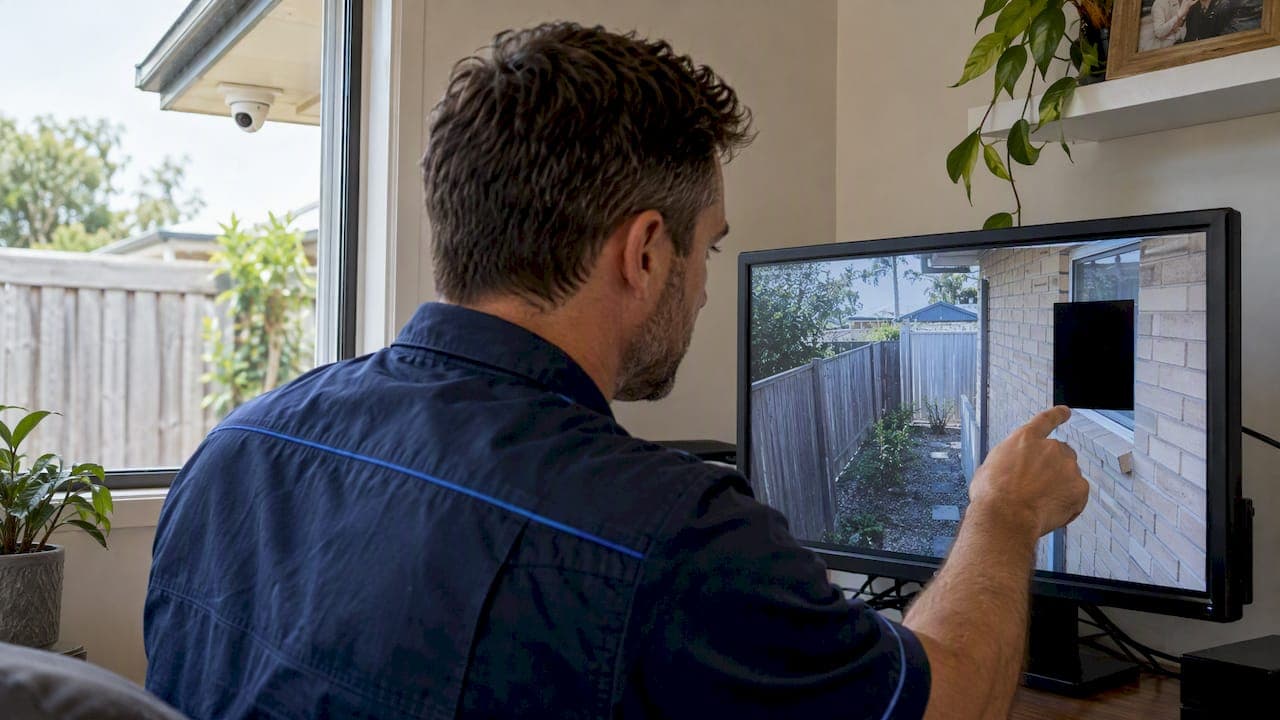
Privacy masking lets a camera cover the area you need while permanently blanking the parts you shouldn't record, such as a neighbour's window, a bathroom, a till screen or a staff-only corner. It is configured in the camera or recorder, shows as a solid block or pixelation, and is one of the cleanest ways to keep a camera useful and respectful at once. It is not a substitute for good camera aim, signage or secure footage handling, and it only works if it's tested properly.
Below, we explain how masks work, when to use one and when to just move the camera, what Australian guidance says, and how to check the install before you sign it off.
TL;DR
- A privacy mask is a fixed block or pixelated zone set in the camera or recorder that hides part of the image. It is different from simply aiming the camera elsewhere.
- Use masks for unavoidable overlap, like a neighbour's window at the edge of a driveway view. If the camera is pointing at the wrong thing, move the camera.
- Masking supports privacy, but OAIC guidance still expects security, notice and sensible retention for covered organisations.
- Test every mask in live view, playback and an exported clip before handover.
- Don't mask the entry point, approach or perimeter you installed the camera to watch.
Table of Contents
- What a privacy mask actually does
- When to use a mask, and when to move the camera
- Neighbours and CCTV in Queensland
- Masking for businesses and commercial sites
- Don't mask away the reason for the camera
- How a mask gets set up
- Perspective: why we set masks on site, not in the app
- Getting masking done as part of a proper install
- Registering your cameras with police
- A pre-handover checklist
- FAQ
- Sources
What a privacy mask actually does
A privacy mask is a defined region of the camera's field of view that the camera itself obscures. Depending on the brand and model, the region appears as a solid colour block or a mosaic of large pixels. You draw it on screen, usually as a rectangle or polygon, and the camera applies it to the video stream.
The important detail is where the mask is applied. A mask applied at the camera (the "edge") is baked into the stream, so the hidden area isn't sitting on the recorder waiting to be un-hidden. Public-sector guidance describes the principle: permanent opaque masks are intended to stop the masked area being recovered later, whereas blurring footage after it has been recorded is a separate redaction job. That distinction matters when you hand footage to police, insurers or a body corporate.
Two things a mask is not:
- Not a lens cover. The camera still sees and processes the scene. A mask hides it from the recorded and viewed image, which is why the setting must be locked behind an admin password.
- Not the same as a camera's "privacy mode". Some consumer cameras have a mode that switches the camera off or rotates the lens inward when you're home. That is a different feature, and not what most installers mean by masking on a fixed security camera.
Block or mosaic?
Most professional cameras offer both. A solid block is the safer choice when the goal is to make sure nothing in the zone can be made out. Mosaic can look less jarring in the live view, but coarse pixelation can still show movement or the rough shape of a person. For a neighbour's bedroom window or a change room, we'd choose a solid block. Mosaic suits areas where you simply want text or detail unreadable, like a monitor.

When to use a mask, and when to move the camera
Masking is the right tool when overlap is small and unavoidable. It is the wrong tool when the camera is badly placed.
| Situation | Better fix |
|---|---|
| Driveway camera clips the edge of a neighbour's window | Mask the window strip |
| Camera on the front corner sees half of the neighbour's pool | Re-aim or relocate the camera, then mask any remainder |
| Office camera covers reception but also a staff monitor | Mask the monitor area |
| Camera sees a bathroom or change room doorway | Relocate, and don't record that space at all |
| Wide-angle camera covers a street you don't need | Narrower lens or re-aim, then mask the strip |
A rule we use on site: if you need to mask more than roughly a fifth to a quarter of the frame, the camera is in the wrong spot or has the wrong lens. You're paying for pixels you then hide. Our guide to where to mount every camera covers the placement logic that avoids this, and how many cameras a home actually needs helps you decide coverage before you start hiding parts of it.
Neighbours and CCTV in Queensland
This is the question behind a lot of searches, from both sides of the fence: someone installing cameras who doesn't want a dispute, and someone who feels a neighbour's camera is looking at them.
In Australia, OAIC explains that the federal Privacy Act generally doesn't apply to an individual using a camera in a private capacity, but state or territory laws may still apply. Other factors can matter too: strata or body corporate rules, council requirements and, since 2025, a statutory tort for serious invasions of privacy. We aren't lawyers, and we can't tell you whether a particular camera breaks the law. For a specific dispute, talk to a Queensland solicitor.
What we can say as installers is what good practice looks like:
- Point cameras at your own property. A Queensland law firm notes that a little overflow is expected, but aiming directly into a neighbour's yard or house could breach their privacy.
- Mask what's left over. A mask over a neighbour's window or pool area is visible evidence that you've thought about it.
- Turn off audio unless you need it. Recording conversations raises a different set of issues from recording images, and most homes don't need it.
- Talk first. Showing a neighbour the live view and the mask often settles things faster than any letter.
- Body corporate sites need approval. The same firm points out that cameras on body corporate property may be allowed with approval, so check your by-laws before mounting anything on common property.
If you're on the receiving end and a conversation hasn't worked, OAIC lists Queensland's Dispute Resolution Centres on 07 3239 6007 as a mediation option. If you feel unsafe, contact police rather than a mediator.
For the broader legal picture, including retention and signage, see our posts on CCTV privacy laws in Australia and CCTV standards on Australian sites.
Masking for businesses and commercial sites
Businesses have a different set of obligations. OAIC says the Privacy Act covers Australian Government agencies, organisations with annual turnover above $3 million and some other organisations. If that's you, images and audio of identifiable people are personal information and need to be handled under the Australian Privacy Principles. Even if your turnover is below the threshold, the same habits are sensible, and employers also need to look at workplace surveillance rules; we cover that in Do You Need a Workplace Surveillance Policy in Australia?.
The OAIC's collection guidance says an organisation may only collect personal information that is reasonably necessary for its work. Masking is a practical way to show you've limited collection. Typical commercial uses:
- Staff monitors and POS screens. Blank the screen, keep the person and the transaction area visible.
- Keypads and safes. Mask the keypad so PIN entry isn't recorded, while the person at the door remains identifiable.
- Neighbouring tenancies. In shared complexes, cameras covering a car park or corridor often clip adjacent doorways or glass.
- Staff amenities. Don't record them. If a camera's view brushes the doorway, mask it and re-aim.
- Medical, legal and other sensitive rooms. Mask documents and screens, and think carefully about whether camera coverage inside those rooms is appropriate at all.
Masking is one control among several
OAIC states that covered organisations should notify people that their image may be captured, keep recorded personal information secure, and destroy or de-identify it when it's no longer needed. A mask does none of that alone. A defensible commercial setup has:
- a documented purpose for each camera
- signage at entry points
- role-based recorder logins, with footage exports logged
- a retention period that you actually enforce
- masks reviewed whenever a camera is moved, replaced or reset
Audio and retention settings are covered in more depth in our CCTV standards guide.
Don't mask away the reason for the camera
The most common mistake we see isn't a missing mask. It's a mask that's too generous, hiding the part of the image that makes the camera worth having.
Queensland Police describe CCTV as an investigative tool, and their home security guide asks whether systems are of sufficient quality to detect, identify and record unwanted activity. They also recommend CCTV as one layer alongside visibility, lighting, access control and maintenance. A camera whose mask swallows the gate, the front door or the side access has been defeated by its own settings.
Practical checks:
- Stand where an intruder would stand and confirm the masked area doesn't hide the approach path.
- Check that the mask doesn't sit over the area you'd need for face identification at night. Lighting on the masked side is irrelevant; lighting on the useful side matters.
- Review night vision range with masks on, because infrared reflecting off a nearby wall can wash out the unmasked area.
- Remember a mask is a fixed rectangle. Trees move, vehicles park differently and PTZ cameras change view, so a mask that works on one preset can fail on another.
How a mask gets set up
Every brand puts the setting in a slightly different menu, but the procedure is much the same. This is the sequence our installers follow.
- Aim and frame the camera first. Set the final field of view, zoom and focus. A mask drawn before the camera is fixed will drift out of place.
- Log in to the camera or recorder as admin. Find the privacy mask setting, often under display, image or overlay options.
- Enable the mask and draw the zone. Use a polygon where the camera allows it, because a window is rarely a clean rectangle. Leave a small margin around the edge, since lens distortion shifts things at the corners.
- Choose block or mosaic. Block for anything that must be unrecoverable by eye.
- Check the stream. Look at the main stream and the sub-stream, because the app on a phone may use a different stream from the recorder.
- Check playback. Record a few minutes, then play it back from the recorder to confirm the mask is part of the recording.
- Export a clip. Open it on a separate computer. If the masked area appears, the mask is not baked into the export, and you need to change the settings.
- Secure the settings. Change default passwords and limit who can edit masks, otherwise anyone with access can remove them.
- Document it. Note the camera, the mask area and the reason. When a camera is replaced or reset, this record saves the mask being forgotten.
On PTZ cameras, masks can be tied to pan and tilt positions and move with the view, but zoom changes can lead to slight misalignment. Test at the extremes of the zoom range and add a margin.
Perspective: why we set masks on site, not in the app
We design, scope, install and configure every system ourselves. No subcontractors are involved, so the person who decides where a camera goes is also the person who commissions it and hands it over. That matters for masking, because a mask is a decision about aim, lens and purpose, not just a checkbox.
Our view is simple. First, pick the camera position that avoids the problem. Second, use a mask for what's left. Third, prove it works by exporting footage and viewing it on another device. Owners often ask us to "blur the neighbour" after install. It's far better to plan that during the site survey, when we can stand at the boundary and see what each lens sees.
We also push back when a mask is being used to make a bad camera position acceptable. If we're masking half the frame, we'd rather re-site the camera and give you a view that serves the purpose. That approach is part of how we aim for a high first-visit fix rate: the system is designed to be right on the day, not patched later.
— Dylan
Getting masking done as part of a proper install
If you're planning new cameras, or you have an existing system that records more than it should, we handle it as part of a site-surveyed security design. Our NYX security camera systems are installed by our licensed team across South East Queensland, with camera positions, masks, audio settings and recorder access set up and tested before handover. If you also need alarm or door control, we cover access control and intercoms so the whole system is designed together.
Before you hire anyone for this job, it's also worth knowing what to check on a licensed security installer.
Registering your cameras with police
If you're in Queensland and want your system to be useful to the community, QPS runs a voluntary Community Camera Alliance. Eligible owners can register, and QPS says it may then contact you if your footage could assist an investigation. Registration tells police where a system is. It doesn't give them access to your cameras. If you do register, your masks should already be tested, because exported footage is what you'd hand over.
A pre-handover checklist
- Each camera has a stated purpose, and the mask doesn't undermine it.
- No camera records a neighbour's bedroom, bathroom or enclosed private space.
- Block masks are used where detail must not be visible.
- Masks appear in live view, in recorder playback and in an exported clip.
- Audio is off unless there is a documented reason.
- Signage is in place where required or sensible.
- Admin passwords are changed, and mask settings are locked.
- Retention is set and deletion is happening.
- Masks and reasons are written down for future maintenance.
FAQ
Can I use a privacy mask to blur a neighbour's window?
Yes, this is one of the most common uses. Draw a solid block or mosaic over the window area in the camera's settings, then check that it appears in playback and in exported clips. If most of the neighbour's yard is in view, move the camera first, because the mask is meant for small leftovers.
Is CCTV an invasion of privacy?
Not automatically. Whether a camera is a problem depends on what it records, where it's aimed and who operates it. In Australia, federal and state rules differ for private individuals and organisations, so for a specific dispute get legal advice.
Does a privacy mask make my business CCTV compliant?
No. A mask helps you limit what is collected, but covered organisations also need notice, secure storage, controlled access and timely deletion or de-identification. Treat masking as one part of a documented system.
Can someone remove a privacy mask later?
Anyone with admin access to the camera or recorder can change the setting, which is why logins must be locked down. Masks applied at the camera stop the hidden area being recorded at all. Check this by exporting a clip and viewing it on another device.
What if my neighbour won't talk about their camera?
Try a calm written request first, then consider mediation. OAIC lists Queensland Dispute Resolution Centres on 07 3239 6007. If you feel threatened or unsafe, contact police or a solicitor.
Sources
- Security cameras, OAIC
- Collection of personal information, OAIC
- Statutory tort for serious invasions of privacy, OAIC
- Community Camera Alliance, Queensland Police Service
- Home Security Guide, Queensland Police Service
- Public Space Cameras (CCTV), Seattle Police Department
- Thinking of Installing a Surveillance System? Here's What QLD Law Allows, Greenhalgh Pickard